- Category
- Ads & assets
- What it changes
- When applied, unpins pinned headlines and descriptions in an RSA in Google Ads
- Reversible
- Yes, the pinning can be set back again
- Data we use
- The pin settings of the assets in each active RSA (no performance data)
- Typical trigger
- An RSA with 4 or more pinned components (at position 2 or higher)
- Priority
- Quality tier: relatively high, but not a blocker for bidding or scaling
What it flagsToo many pinned headlines in a responsive search ad
Pinning in responsive search ads means locking a headline or description into a fixed position, for example always at headline position 1. That's sometimes useful (required legal copy, a brand name that has to lead), but the more you pin, the less room Google has left to assemble the best-performing combination itself.
This recommendation looks at your active RSAs and counts how many components are pinned. If an ad is way above what's needed, AdBuilder flags it so you can reconsider the pinning. It's a quality signal: it's about the ad's setup, not click or conversion numbers.
Why it mattersToo much pinning drags down your Ad Strength
A responsive search ad works best when Google can test many combinations of headlines and descriptions and pick the strongest combination per auction. Every pinned asset removes a degree of freedom. Pin too much, and Ad Strength drops, with the system effectively testing almost nothing anymore.
A lower Ad Strength often comes with fewer impressions and a weaker position in the auction. By only pinning what genuinely needs to be fixed, you give Google room to optimize and keep your ad quality high.
How it worksWhen the recommendation appears
AdBuilder pulls all active responsive search ads where the ad, the ad group and the campaign are all set to ENABLED. For each ad it counts how many headlines and descriptions are genuinely pinned. Only a pin at a concrete position counts (position 2 or higher, so HEADLINE_1, HEADLINE_2, DESCRIPTION_1 and so on); an empty or unknown pin value doesn't count as pinned.
An ad comes into view once 4 or more components are pinned. AdBuilder sorts by the number of pinned components and shows the most heavily pinned ads first. Each check run surfaces a maximum of 5 of these ads, so you can work through them calmly one at a time instead of dozens at once.
There's no lookback window and deliberately no conversion or performance threshold: this is a purely structural signal based on the pin settings. Every flagged ad gets its own card, so you can dismiss one (for example because it genuinely needs legal pinning) without the others disappearing too. Once the pinning is undone, the card disappears on its own.
- Only responsive search ads that are active (ad, group and campaign all ENABLED).
- Threshold: 4 or more pinned components, where only genuine pins at position 2 or higher count.
- Most heavily pinned ads first; maximum 5 cards per check run.
- No performance or conversion condition and no lookback window; it's a structural signal.
What you can doUnpin or deliberately leave it
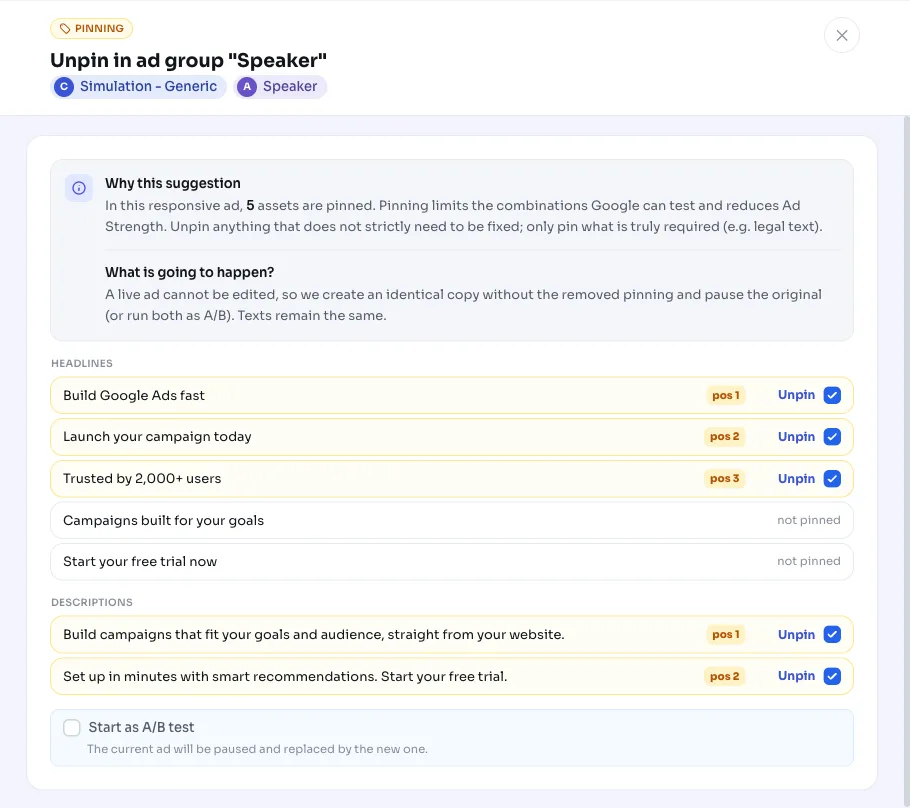
AdBuilder offers to unpin the pinning in the flagged ad. Apply the recommendation and the pinned headlines and descriptions are unpinned in Google Ads, so they can rotate freely again and Ad Strength can improve. The copy itself stays unchanged; only the fixed positions are removed.
If you want to keep certain pins, for example mandatory legal text or a brand name that must come first, leave those in place and only unpin what doesn't strictly need to stay fixed. You decide per ad what can go. The action is reversible: you can restore the pinning later if needed.
- Apply: AdBuilder unpins the pinning in the ad in Google Ads.
- Keep deliberately: leave pins in place that really need to be there (legal text, brand name up front).
- Dismiss: dismissing one ad leaves the other flagged ads untouched.
- Undo: the unpinned pinning can be restored.
Frequently asked questions
What does pinning mean in responsive search ads?
Pinning means locking a headline or description to a fixed position in a responsive search ad, for example always as the first headline. Without pinning, Google freely rotates the components and tests which combination performs best.
Should I pin headlines in Google Ads?
Usually not. Only pin what really needs a fixed spot, such as mandatory legal text or a brand name. Pinning too much limits the combinations Google can test and lowers Ad Strength.
From how many pinned components do I get this alert?
AdBuilder flags a responsive search ad once 4 or more components are pinned. Only real pins at a specific position (position 2 or higher) count; an empty or unknown pin value doesn't.
Can I restore the pinning after applying?
Yes. The action is reversible: you can restore the unpinned pinning later. Your ad copy doesn't change, only the fixed positions are removed.
Why do I only see part of my over-pinned ads?
Per check, AdBuilder shows a maximum of 5 ads, the most heavily pinned first. That way you can work through them at your own pace; the next round picks up the rest as long as they still meet the threshold.