- Category
- Bidding & budget
- What it changes
- Only your performance target (target value) in AdBuilder; nothing in Google Ads
- Reversible
- Yes, you can always adjust the target value again
- Data we use
- Your stored daily data (CPA, ROAS, conversions, clicks) over two 30-day windows
- Typical trigger
- Target is beaten by at least a 15% margin in both windows
- Priority
- Low: fine-tuning your target, not a blocking issue
What it detectsYou're beating your performance target too easily
You've set a performance target for this account: a target value for your target CPA, ROAS, number of conversions or number of clicks. This recommendation appears when AdBuilder sees you're not just meeting that target by chance once, but consistently and comfortably exceeding it.
Consistently here means: for two months in a row. We look at the last 30 days and the 30 days before that. If you clearly outperform your target in both periods, your target value is probably set too cautiously, and we let you know you can tighten it.
If you have both a primary and a secondary target, we assess them separately. The recommendation fires as soon as at least one of the two is consistently beaten, and names exactly which one.
Why it mattersA target that's too easy leaves returns on the table
A performance target is the measurement lens for your account: the number you judge success by. If that number is set too loosely, everything always looks on track, and you miss the signal that there's still room to steer sharper.
That counts extra with smart bidding. If your bid strategy in Google Ads steers on a target CPA or target ROAS, that target value determines how aggressively it bids. If your account beats the target with a margin time and again, you often have a choice: a sharper target CPA for lower cost per conversion, or more volume at the same efficiency. A target you always comfortably meet keeps that choice invisible.
A sharper, but realistic target keeps the pressure on for improvement and keeps AdBuilder's other recommendations focused on what's genuinely still to be gained.
How it worksTwo 30-day windows, at least a 15% margin
This recommendation calculates purely from your own stored daily data. No request goes to Google and nothing in your account is changed; it's a read operation on your history.
We compare two consecutive full 30-day windows. A metric only counts as consistently beaten if it hits the target by at least a 15% margin in both windows. For a target CPA (lower is better), that means a measured CPA of at most 85% of your target; for ROAS, conversions or clicks (higher is better), at least 115% of your target.
For the ratio metrics CPA and ROAS, a minimum of 5 conversions per window applies (and cost above zero), otherwise the ratio is too shaky and that window doesn't count. Since both windows need enough data, a brand-new account with only 30 days of history won't trigger this yet. Conversions and clicks are simply summed over each window.
- Precondition: a performance target must be set. If there's no target, this signal doesn't apply and you'll instead see the recommendation to set one.
- Margin: 15% (target CPA: at most 85% of your target; ROAS, conversions, clicks: at least 115%).
- Windows: the last 30 days and the 30 days before that, both with enough data.
- Thin-data floor for CPA and ROAS: at least 5 conversions per window.
- Primary and secondary target are assessed separately; the recommendation names which target was beaten.
What you can doAdopt a sharper target value or enter your own
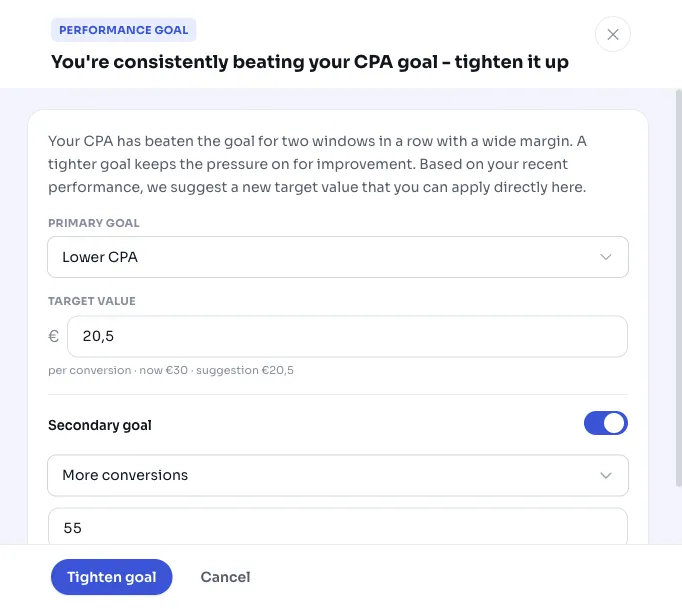
With the recommendation, we already propose a new target value, based on your performance over the last 30 days plus a modest 10% stretch margin. That way the new target sits just a bit more ambitious than what you recently ran, while staying realistic. For a target CPA the suggestion is 10% sharper (cheaper); for ROAS, conversions and clicks, 10% higher.
An example: if your target CPA is set at 30 euros and you've been comfortably beating it for two months, the suggestion might land around 20.50 euros. You don't have to accept it blindly.
You set the new target directly from the recommendation. Nothing goes to Google Ads; you're only adjusting your target value within AdBuilder, and you can always change it back later. Want to wait a bit longer? Postpone the recommendation or mark it as not applicable.
- Adopt the proposed, sharper target value.
- Enter your own target value if you find the suggestion too strict or too loose.
- Postpone the recommendation or mark it 'not applicable' if you deliberately keep your target loose.
Frequently asked questions
Should I lower my target CPA if I consistently hit the target?
Not required, but often a good idea. If you beat your target CPA by at least a 15% margin for two months in a row, it's probably set too loosely. Tightening it can lower cost per conversion or free up room for more volume. The recommendation makes a concrete proposal; you decide whether and how much to tighten.
Does this recommendation change anything in my Google Ads account?
No. The recommendation only reads your own daily data and changes nothing in Google Ads. If you adopt the proposal, only your performance target (the target value) changes within AdBuilder. You can always adjust that later.
Why don't I see this recommendation even though I'm hitting my target?
There are a few reasons. You need to hit the target in two consecutive 30-day windows, each time by at least a 15% margin. For a target CPA or ROAS you also need at least 5 conversions per window, otherwise the ratio is too thin to judge. If you're only just hitting the target, or the account is too new for two full windows, the signal won't appear.
What if I think the proposed target is too strict?
Then enter your own target value, or leave your current target as is and postpone the recommendation. The proposal is recent performance plus 10%, meant as a starting point, not an obligation. Everything you set is reversible.