- Category
- Targeting & structure
- What it changes
- Sets a bid modifier per age or gender group (lower or higher)
- Reversible
- Yes, you can revert the bid adjustment
- Data we use
- Cost, conversions and clicks per age/gender group from age_range_view and gender_view (search campaigns)
- Typical trigger
- Manual bidding or Maximize clicks, a group with enough conversions and a CPA that deviates sharply from the ad group average
- Priority
- Low, this is bid fine-tuning
What it flagsAge or gender groups converting too expensively or too cheaply
Within an ad group, not every age or gender group performs equally. Some groups produce conversions that are far more expensive than the ad group average, while others convert noticeably cheaply. With manual bidding, you can steer this with a bid adjustment per group (a bid modifier).
This recommendation looks at groups that do convert, but at a cost per conversion (CPA) that clearly deviates. That's different from groups with zero conversions, which are handled by the recommendation that excludes demographic groups. Adjusting demographic bids complements that: not excluding, but tuning the bid.
This applies purely to search campaigns with a bid strategy that actually honors such adjustments. With Smart Bidding, Google ignores the fractional bid adjustment per demographic, so AdBuilder doesn't make a suggestion there.
Why it mattersAdjusting bids by age or gender keeps your budget efficient
If an expensive group gets the same bid as the rest, you're overpaying for those conversions. Conversely, you're leaving performance on the table when a group that converts cheaply doesn't get more room. Bidding on demographics in Google Ads is a direct way to shift your spend toward the traffic that performs best.
AdBuilder only does this when there's enough data under a group to reliably compare CPA. A group with two conversions over a month is noise, not a signal. That's why there are thresholds for the number of conversions and for the comparison baseline, so an adjustment rests on numbers, not chance.
How it worksThe thresholds behind the demographic bid adjustment
AdBuilder pulls cost, conversions and clicks per ad group by age group (age_range_view) and gender (gender_view), only for ad groups and campaigns that are active in the search network. The bid strategy must be manual CPC or Maximize clicks; other strategies are skipped. Removed criteria don't count, since there's no bid to set on those.
The analysis window is dynamic: 30, 60 or 90 days, depending on how much volume the account has (more volume means a shorter, fresher window). The window ends three days back, so not-yet-fully-attributed conversions don't skew the picture. The cooldown after a recommendation matches the window length.
The comparison baseline is calculated separately per dimension: age and gender describe the same traffic, so adding them together would roughly double the baseline and undermine the conversion threshold. A dimension only counts if it has at least 5 conversions. A single group only counts from at least 1 conversion and at least €10 in cost (zero conversions is the territory of the exclusion recommendation).
- Reference CPA via leave-one-out: the group average is calculated excluding the group being evaluated, so a large group doesn't skew its own judgment. That benchmark needs at least 3 remaining conversions.
- Reliable segment (10 or more conversions): judged on raw CPA. Lower the bid if CPA is above 1.4 times the benchmark, raise it if CPA is below 0.7 times the benchmark.
- Thin segment (3 to 9 conversions): judged on a pooled CPA drawn toward the campaign average. Only genuinely extreme deviations survive that correction.
- The size of the adjustment is capped: it can go down by up to 90 percent (Google's floor), and up by at most 50 percent above the current modifier per step. Values are rounded to 0.05.
- Up to 10 groups are suggested per recommendation, sorted by cost. Ad groups in a campaign with an open device, location or day-part bid adjustment are skipped, since bid modifiers multiply.
What you can doReview and apply the suggested bid adjustments
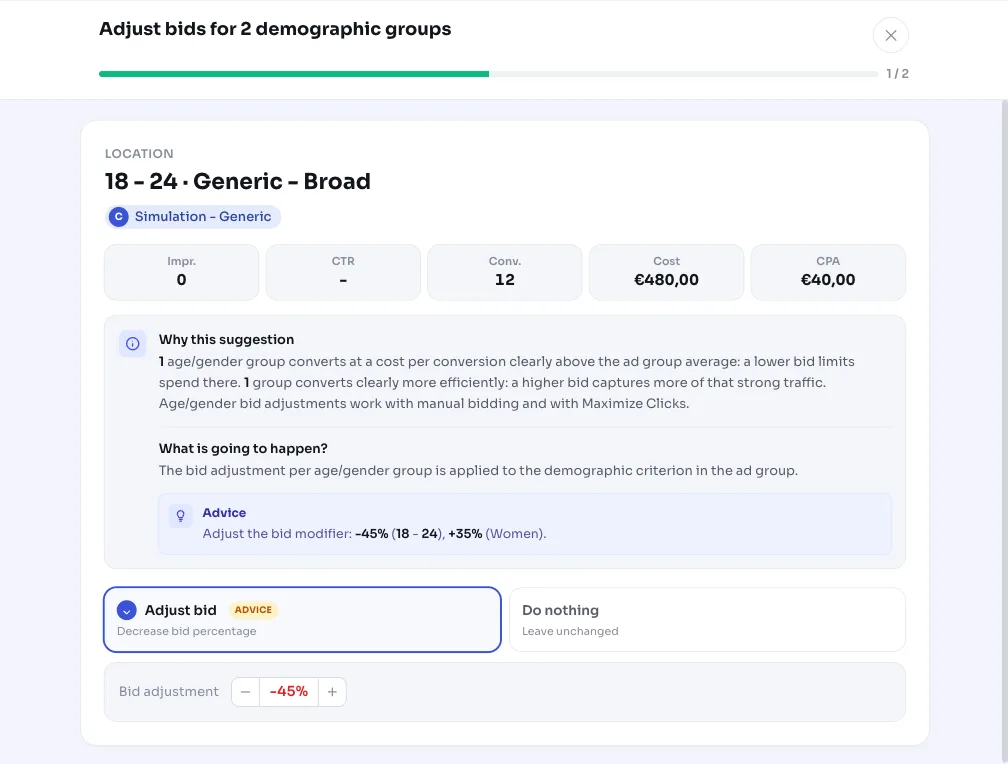
You'll see a concrete proposal per group: the current bid modifier, the suggested new value, and whether it's a decrease or increase. Applying it sets the bid adjustment on the relevant criterion in the ad group. Since it's an adjustable modifier, you can revert the change later.
If you work with a selection of conversion actions, AdBuilder only counts the included actions per group in the CPA judgment, so the recommendation matches the conversions you're steering by.
- Lower: the bid on groups that clearly convert more expensively than the ad group average goes down, so you waste less there.
- Raise: the bid on groups that convert more efficiently goes up, so you capture more of that strong traffic.
- You can choose yourself which groups to include and which to leave as is for now.
Frequently asked questions
Which campaigns and bid strategies does this work for?
Only search campaigns with manual CPC or Maximize clicks. Those strategies fully honor a bid adjustment per age or gender. With Smart Bidding, Google ignores the fractional demographic modifier, so AdBuilder doesn't make a suggestion there.
How do I set demographic bid adjustments through this recommendation?
You don't need to look anything up manually. AdBuilder shows the current and suggested bid modifier per group. If you apply the recommendation, the new modifier is set on the criterion in the ad group. You can undo the change later.
When does AdBuilder exclude a demographic group instead of adjusting the bid?
Groups with cost but zero conversions fall under the recommendation that excludes demographic groups. This recommendation is specifically about groups that do convert but at a cost per conversion that deviates sharply.
Why does the recommendation require so many conversions?
A group with a handful of conversions over a month doesn't give a reliable CPA. That's why the dimension requires at least 5 conversions as a base, a group only counts from 1 conversion and €10 in cost, and AdBuilder only judges firmly at 10 or more conversions. Thin groups (3 to 9) are judged more cautiously on a CPA drawn toward the campaign.