- Category
- Targeting & structure
- What it changes
- Adds negative age or gender criteria at the ad group level
- Reversible
- Yes, the exclusion can be reverted, including any prior bid adjustment
- Data we use
- age_range_view and gender_view from your search campaigns over the last 30 days
- Typical trigger
- 0 conversions, at least 5 clicks and cost above max(floor, 2x reference CPA)
- Priority
- Layer 3 (waste)
What it flagsWhat this recommendation flags
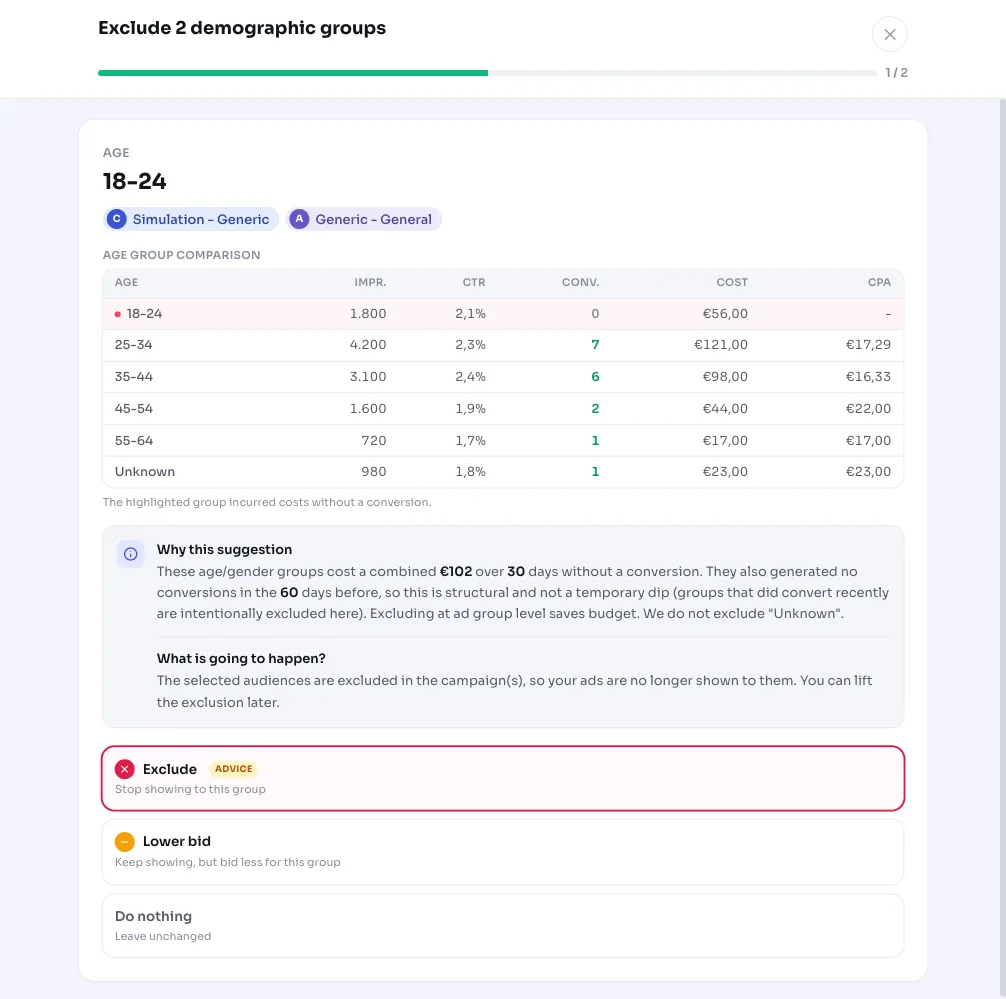
AdBuilder looks per ad group at the age and gender groups within your search campaigns. As soon as a group costs clicks and money but produces zero conversions over the measurement period, it becomes a candidate for exclusion.
This applies purely to search campaigns that are active (both ad group and campaign enabled). We never exclude the "Unknown" group (age or gender not determined), since it often covers a large share of your traffic, and excluding it would cut too many good impressions.
Why it mattersWhy wasteful demographic targeting costs money
Every click from an age or gender group that consistently doesn't convert is budget spent on the wrong people. That money could have gone to groups that do convert, or to more reach within your strong audience.
Demographic targeting in Google Ads is a handy lever for correcting this: you don't have to pause your entire ad group, you just cut the part of the audience that clearly delivers nothing. This recommendation does the legwork for you and shows exactly which groups are involved.
How it worksHow AdBuilder detects demographic waste
We pull the age breakdown (age_range_view) and gender breakdown (gender_view) per ad group from your active search campaigns. The analysis window is the last 30 days by default, ending 3 days ago so late conversions can still come in and a group isn't wrongly counted as "0 conversions". On low-volume accounts, the window is automatically extended so there's still enough data for a fair judgment.
A group is only flagged as a candidate if it meets all the conditions below. The cost threshold scales with your account: once a reference CPA is known, the binding bar is the higher of the absolute floor and twice that reference CPA. That way we only flag groups that have burned through roughly two missed conversions' worth of budget.
- No conversions: 0 conversions and less than €1 in conversion value within the window.
- Enough traffic: at least 5 clicks, so "0 conversions" actually means something.
- Above the cost threshold: with a reference CPA, cost >= max(floor, 2x reference CPA); the floor is €25 on medium and high-volume accounts and €10 on low-volume accounts. Without a reference CPA, the fallback applies: at least 5 clicks and at least €5 in cost.
- No temporary dip: groups that did convert in the 60 days before the window are left out, since they're likely in a brief slump.
- Not already excluded: groups with an existing negative criterion are skipped.
- "Unknown" never counts, and up to 10 groups are shown per recommendation, sorted by highest cost.
What you can doWhat you can do
You have two options. The direct move is to exclude the group: AdBuilder creates a negative age or gender criterion at the ad group level, so that group no longer gets ads shown. For an ad group like Summer sale where, say, 18-24 cost fifteen clicks without a conversion, that's often the fastest win.
If you'd rather be more cautious, there's a softer alternative per group: a negative bid adjustment (roughly 40 to 70 percent, larger the more clicks without conversions there were). You keep advertising to that group, just at a lower bid, so you can still adjust based on new data.
Both actions are reversible. When excluding, we preserve the existing bid adjustment on the original criterion, so reverting restores the group exactly as it was, including any previously set manual bid adjustment.
- Exclude: negative age or gender criterion on the ad group (direct saving).
- Lower bid: negative bid adjustment as a milder alternative, you keep serving the group at a lower bid.
- Revert: the original criterion is restored, including any prior bid adjustment.
Frequently asked questions
What does excluding a demographic group in Google Ads mean?
You're telling Google Ads that a specific age or gender group within an ad group should no longer see ads. You do this by setting a negative demographic criterion at the ad group level. The rest of your audience keeps seeing your ads as normal.
How do I exclude an age group?
AdBuilder does this for you: if you approve the recommendation, we create the negative age criterion on the relevant ad group. If you'd rather do it yourself in Google Ads, set the desired age group to excluded in the ad group's demographic targeting.
Why is the "Unknown" group never excluded?
For part of your traffic, Google can't determine age or gender. That "Unknown" group is usually a sizeable share of your reach and includes converting traffic too, so excluding it would remove too many good impressions. That's why we always leave that group alone.
Can I undo the exclusion?
Yes. The action is reversible: reverting restores the original criterion, including any bid adjustment that was there. You're not locked into the exclusion.
Does this also work for a Performance Max or Display campaign?
No. This recommendation only looks at search campaigns and excludes demographic groups at the ad group level. Waste in other campaign types is addressed through other recommendations, such as excluding placements or unwanted content.