- Category
- Bidding & budget
- What it changes
- Lowers the daily budget of donor campaigns by 20% and raises that of recipients (max +50% per round)
- Reversible
- Yes, budget changes can always be set back
- Data we use
- 30 days of cost, conversions, clicks and lost impression share due to budget (Search)
- Typical trigger
- At least 1 slow or expensive campaign alongside 1 efficient campaign missing 10% or more impressions due to budget
- Priority
- Tier 5 (budget scaling): after cleanup, keywords and bidding
What it signalsWhen does AdBuilder suggest rebalancing budget?
Within an account, campaigns rarely perform equally. Some search campaigns don't use up their daily budget (efficiently): they spend money without converting, or convert noticeably more expensively than the account average. Other campaigns hit their budget cap and miss out on impressions they could have won.
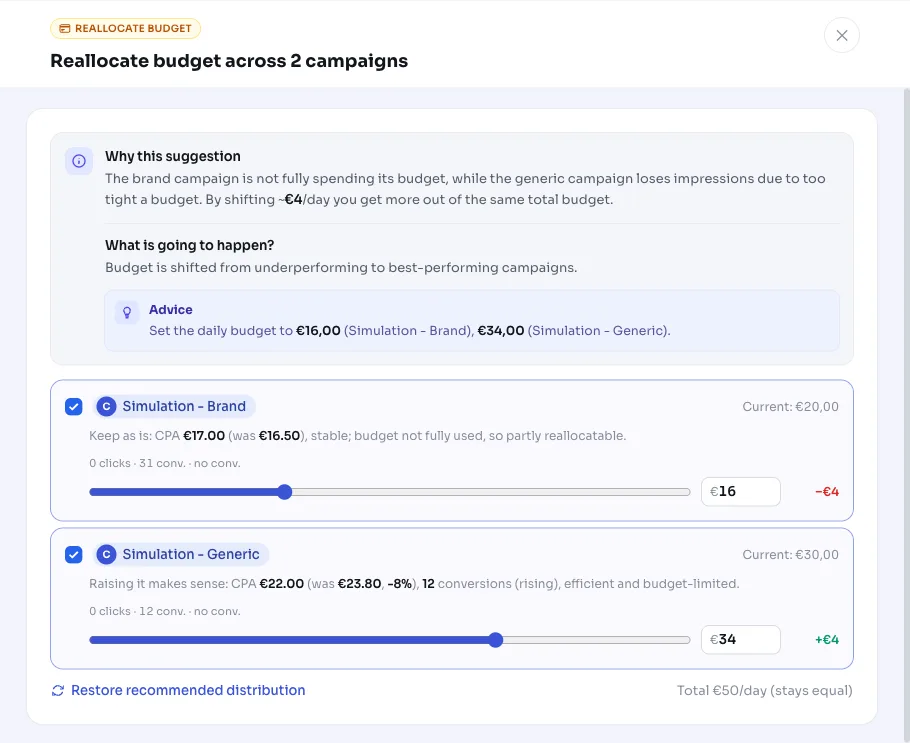
AdBuilder recognizes that pattern and suggests shifting budget between campaigns: from the slow or expensive side (the donors) to the efficient, budget-constrained side (the recipients). Your total daily budget stays roughly the same net, so you're not spending more, you're just putting the same money to better use.
Why it mattersWhy rebalancing your Google Ads budget pays off
Budget tied up in a campaign that doesn't convert, or converts too expensively, delivers little. Meanwhile, an efficient campaign is missing conversions purely because its budget ran out. By optimizing budget across campaigns, you shift money to where it delivers more results, for the same cost.
This is deliberately a budget-neutral optimization: no increase to your total spend, just a better split. That makes the change low-risk, since you're only ever redistributing something you can set right back.
How it worksHow AdBuilder picks donors and recipients
AdBuilder looks at your search campaigns (Search) over the past 30 days and splits them into donors and recipients. Only campaigns with their own (non-shared) daily budget are included, and budgets you've already adjusted yourself in the last 30 days are skipped. If your account had zero conversions in that period, AdBuilder doesn't shift anything.
The thresholds are fixed, so the rebalance only fires on a clear signal:
- Recipient: misses at least 10% of impressions due to too tight a budget, has at least 5 conversions and a CPA at or below the account average.
- Donor (slow campaign): itself loses less than 5% of impressions to budget, spent at least EUR 50 in the window and had 0 conversions on at least 30 clicks.
- Donor (expensive campaign): does convert, but with a CPA above 1.3x the account average.
- Campaigns younger than 14 days don't count as a donor, since they're still in the learning phase.
- Shared budgets aren't included: a decrease there would also affect sibling campaigns.
What you can doWhat to do with the recommendation
Each donor gives up 20% of its daily budget. That pool goes to the recipients in proportion to how many impressions they're missing, capped at +50% per recipient per round. Anything the cap can't absorb is added back to the donor's decrease, so the total daily budget stays roughly net the same. Each recommendation handles at most 10 donors and 10 recipients.
You stay in control of whether and how you apply the rebalance:
- Apply: AdBuilder adjusts the daily budgets in one go, donors down and recipients up.
- Review first: you see the current and proposed daily budget per campaign, the role (donor or recipient), the CPA and the lost impression share.
- Undo: since it's only about budget amounts, you can always set the change back.
- Dismiss: if the rebalance doesn't fit your plan, just skip the recommendation.
Frequently asked questions
How do I split my Google Ads budget across campaigns?
AdBuilder does this for you based on 30 days of data: it flags campaigns not efficiently using their budget as donors, and campaigns missing impressions due to budget as recipients. You just need to review and apply the proposed rebalance.
Does this recommendation raise my total budget?
No. The rebalance is roughly net neutral: the donors give up about as much as the recipients gain. So you're not spending more, the budget is just distributed differently.
Can I undo the rebalance?
Yes. It's purely about daily budget amounts, which you can always set back to their previous values.
Does shifting budget between campaigns also work with shared budgets?
No. Campaigns with a shared budget aren't included, since a decrease there would also affect the other campaigns on that budget. Only own, non-shared daily budgets are rebalanced.