- Category
- Keywords
- What it changes
- Pauses the duplicate keywords and keeps the best one per group
- Reversible
- Yes, you can turn paused keywords back on
- Data we use
- Enabled keywords + clicks, CTR, conversions and cost over 30 days
- Typical trigger
- 2 or more enabled keywords with the same text and the same match type in the same campaign
- Priority
- Low, this is cleanup work
What it flagsWhat are duplicate keywords in Google Ads?
A duplicate keyword is exactly the same keyword text with exactly the same match type enabled more than once within the same campaign. Think of the keyword buy shoes as exact match in two ad groups of the same campaign, or accidentally added twice to the same group.
AdBuilder groups your enabled keywords by the combination of campaign, text (lowercase, leading/trailing spaces ignored) and match type. If a keyword then sits in a group with 2 or more instances, that's a duplicate group. Keywords with different match types (for example exact versus phrase) don't count as duplicates, since they deliberately cover a different set of searches.
Why it mattersWhy duplicate keywords get in your way
Google shows only one of your keywords per auction, usually the one with the best expected performance. So two identical keywords don't generate extra reach, but they do split your data: clicks, conversions and quality signals get divided across two entries instead of building up on one.
That makes it harder to see what a keyword is actually doing, and it makes reporting and optimization messier. Deduplicating fixes that: you keep the strongest variant, consolidate the history there and keep your account organized.
How it worksHow AdBuilder finds duplicate keywords
We pull all enabled, non-negative keywords from active ad groups in active campaigns, with their figures over the last 30 days. We group those by the key campaign + keyword text + match type. Every group with at least 2 instances is a candidate.
For each group, we determine which keyword is best to keep. The order is: most conversions first, then highest click-through rate (CTR) on a tie, then most clicks, and finally lowest cost. The winner stays, the rest becomes the proposed pause set.
We show at most 10 duplicate groups at once, sorted by the group's combined cost (largest first), so the duplicates with the most money involved appear at the top. If there are more, they come in a later round. An important detail: the key looks at the campaign, not the ad group. Two identical keywords in different ad groups of the same campaign also count as duplicates.
- Trigger: 2 or more enabled keywords with the same text and the same match type within the same campaign.
- Lookback window: 30 days for the performance figures that determine the winner.
- Winner: most conversions, then highest CTR, then most clicks, then lowest cost.
- Display: up to 10 groups, sorted by the group's total cost.
What you can doDeduplicate keywords: your choices
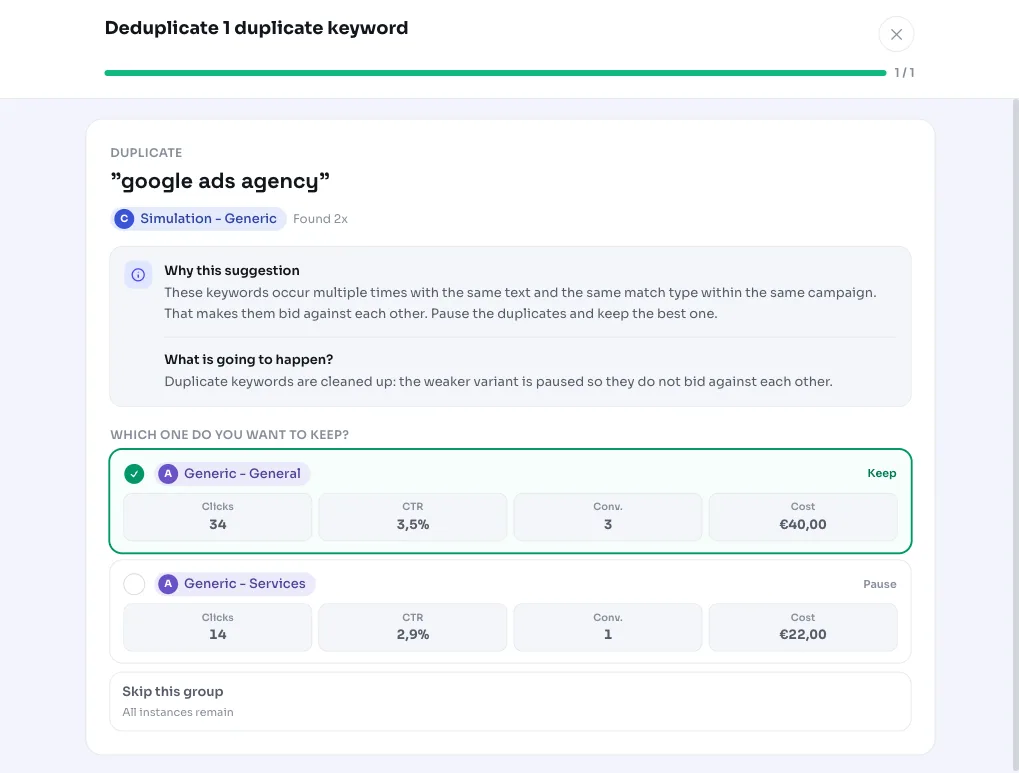
You handle the recommendation per duplicate group. By default, AdBuilder keeps the suggested winner and pauses the other instances. You can choose the winner yourself per group, for example if you deliberately want to keep a specific ad group.
The action pauses the duplicate keywords, it doesn't delete them. If something changes or you want to undo it, you simply turn the paused keywords back on. That keeps the change fully reversible.
- Keep the winner and pause the rest (the default choice).
- Choose the winner yourself per group if you want to keep a different ad group.
- Fully reversible: you can turn paused keywords back on later.
Frequently asked questions
How do I find duplicate keywords in my account?
AdBuilder does that automatically. With every analysis we group your enabled keywords by campaign, text and match type and flag every group with 2 or more identical instances. You don't need to search manually.
Are duplicate keywords deleted or paused?
Paused. We keep the best-performing variant and pause the others. We don't delete, so you can always undo the action by re-enabling the keywords.
Do keywords with a different match type also count as duplicates?
No. Only keywords with exactly the same text and the same match type within the same campaign count as duplicates. For example, the same keyword as exact match and as phrase match doesn't count as a duplicate, since they cover a different set of searches.
Do identical keywords in different ad groups also count as duplicates?
Yes, as long as those ad groups are in the same campaign. The comparison looks at the campaign, not the ad group. If the identical keywords are in different campaigns, that falls under the recommendation for cross-campaign cannibalization.
What figures does AdBuilder use to decide which keyword stays?
Performance over the last 30 days. We choose the keyword with the most conversions; on a tie, the highest CTR, then the most clicks, and finally the lowest cost.