- Category
- Ads & assets
- What it changes
- Creates a new active responsive ad for each empty ad group
- Reversible
- Yes, reverting pauses the newly created ad (the copy is kept)
- Data we use
- Active keywords (keyword_view) and ad status plus policy approval (ad_group_ad); no performance data
- Typical trigger
- A group with active keywords but not a single active, approved ad
- Priority
- High: a group that doesn't serve is a precondition for every other recommendation on that group
What it flagsAd groups that aren't serving
An ad group needs two things to attract traffic: at least one active keyword and at least one active, approved ad. Without that ad, the group stays empty: the keywords are ready to go, but there's nothing to show. The result is an ad group that isn't serving, even though everything still looks 'on' in the overview.
This kind of situation creeps up on you. You pause an ad to swap in a new version and forget the last step, an ad gets disapproved and removed, or you build a new group with keywords but no ad. In every case, the group keeps its active keywords but has no ad ready to serve.
AdBuilder bundles these groups into a single recommendation. If a group has only a disapproved ad, this check leaves it alone: that case belongs to the disapproved-ads recommendation, which fixes the existing ad instead of creating a second one.
Why it mattersAn empty group is wasted structure
An ad group with no active ad is a hole in your account. You've chosen keywords, set bids and built out the group, but not a single impression comes out of it. All that work sits idle as long as nothing is serving, and you often only notice when the numbers for that group stay flat at zero.
That's why this recommendation carries a lot of weight. A group that isn't serving is a precondition for almost everything else you'd want to do next: adjusting keywords, tweaking bids or shifting budget is pointless as long as no ad is running. AdBuilder treats this at the same level as a disapproved ad: the structure is fine, but serving is broken, and you fix that first.
How it worksHow AdBuilder runs the check
AdBuilder pulls two things from your search campaigns. First, the active keywords per group: only keywords set to 'ENABLED', in an active ad group and an active search campaign. Groups without active keywords are skipped, since there's no traffic to recover there. Then it pulls every non-removed ad in those same groups, along with its status and policy approval.
An ad counts as serving when it's active and not disapproved. For an unknown status, AdBuilder deliberately assumes the ad is serving, so the recommendation doesn't fire incorrectly. A group only shows up in the recommendation if there's not a single serving ad and no active-but-disapproved ad either (that case belongs to the disapproved-ads recommendation).
This check doesn't use performance data and has no lookback window: it's a snapshot of the structure. So there's no conversion threshold either. AdBuilder shows a maximum of 5 groups per recommendation; if there are more, the rest follow in a later round. After you apply the recommendation, it stays in place for 14 days (the rollback window), so your change doesn't get overwritten; after that, the check picks up any remaining or newly emptied groups again.
- Source: active keywords (keyword_view) plus ad status and policy approval (ad_group_ad).
- Serving = active and not disapproved; unknown status counts as serving (no false alarms).
- Only active search campaigns and active ad groups count.
- Groups with only a disapproved ad go to the disapproved-ads recommendation.
- Maximum 5 groups per recommendation; no performance or conversion threshold.
What you can doGenerate a new ad for each group
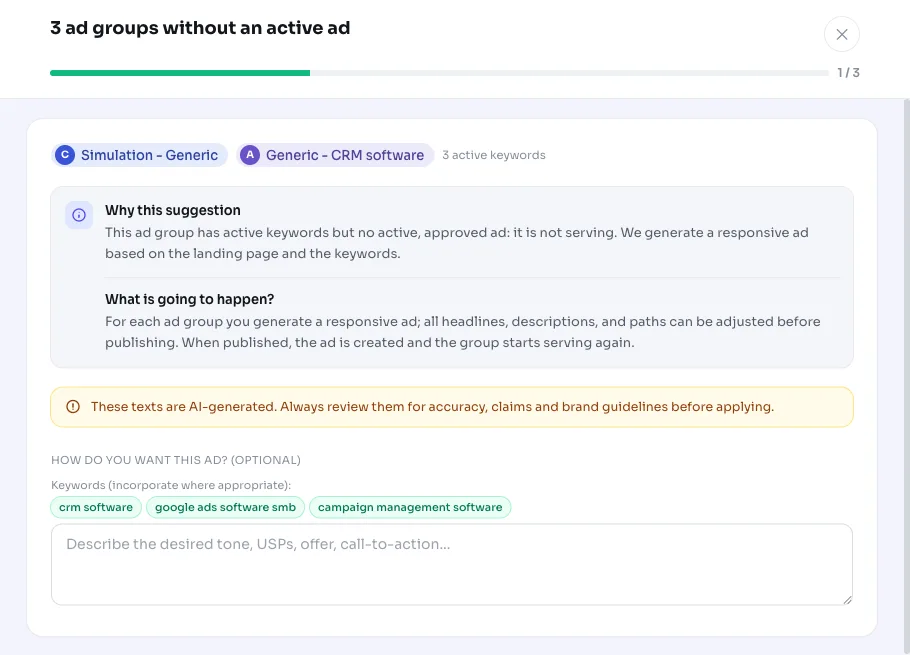
For every flagged group, AdBuilder generates a responsive ad based on your landing page and that group's keywords. If there was still a paused ad in the group, AdBuilder uses its landing URL and existing copy as a starting point; otherwise it uses your account's URL. You edit the headlines and descriptions yourself before publishing.
When you apply it, AdBuilder sets the edited ad active in the group. There need to be at least 3 valid headlines and 2 valid descriptions, otherwise AdBuilder skips that group and tells you why. Each group is handled separately: if one group fails, the others still go through.
You can always revert. On revert, AdBuilder pauses the ad it just created instead of deleting it, so the generated copy stays saved in Google Ads. The group is back to how it was before.
- Generate a responsive ad per group from the landing page and keywords.
- Edit the headlines and descriptions before publishing.
- Applying sets the ad active; at least 3 headlines and 2 descriptions required.
- Reverting pauses the new ad and keeps the copy.
Frequently asked questions
Why isn't my ad group serving?
Usually because the group has active keywords but not a single active, approved ad. Without an ad there's nothing to show, so no traffic comes in, even though the keywords are switched on. This recommendation pinpoints exactly those groups.
What happens if I apply this recommendation?
AdBuilder creates a new active responsive ad for each flagged group, using the headlines and descriptions you generated and edited. The group can then serve again.
What if the group does have an ad, but it's disapproved?
Then it won't show up here. A group with only an active-but-disapproved ad belongs to the disapproved-ads recommendation, which fixes the existing ad. That way you don't end up creating a duplicate ad.
Can I undo this?
Yes. Reverting pauses the created ad instead of deleting it, so the copy stays saved in Google Ads and the group returns to its previous state.
Why do I only see a few groups at a time?
AdBuilder shows a maximum of 5 groups without an active ad per recommendation. If there are more, the check picks up the rest in a later round, even after the 14-day rollback window has passed.