- Category
- Keywords
- What it changes
- Adds new phrase-match keywords to existing ad groups
- Reversible
- Yes, added keywords can be removed again
- Data we use
- 30 days of cost and conversions per ad group (Search), plus search volume
- Typical trigger
- Converting ad groups with a CPA at or below your account average
- Priority
- Low (growth): only appears once waste, bids and budget are in order
What it flagsYou're not yet reaching searchers who are comparing options
Part of your audience doesn't buy right away, they compare first. They search for the best option, the cheapest, or an alternative before choosing. If your ad groups have no keywords for that, you're missing those buying-intent searchers.
This recommendation signals that an ad group converts well and there's room to add competitor-focused keywords: terms with a clear comparison or choice signal, such as best, cheapest, compare, versus or alternative. That way you also show up for people who are still weighing options.
Why it mattersComparison and alternative searchers are close to purchase
Someone searching for the cheapest or best option is past the research phase and about to choose. That traffic often has higher buying intent than broad, general keywords.
By only adding such keywords to ad groups that already prove out, you expand your reach in a place where extra clicks stand a real chance of converting. It's a growth step: only used once waste in your account is handled and your bids and budget are on track.
How it worksHow AdBuilder chooses the keywords and ad groups
AdBuilder pulls active keywords, cost and conversions from your search campaigns over the last 30 days (enabled ad groups in Search-type campaigns only). Based on that, it determines per ad group whether expansion makes sense.
Only ad groups that actually convert qualify. A group counts if it has at least 1 conversion and a cost per conversion no more than twice your account average. From those groups, the best-converting ones are chosen (up to four). If no group converts, or your account doesn't measure conversions, AdBuilder makes no proposal: there's no way to determine where extra traffic would pay off.
For the chosen groups, new keyword suggestions are generated (six per group) and then strictly filtered. Only terms with a genuine comparison or choice signal remain; purely informational terms (like review, experiences or test) are excluded, since they draw traffic without buying intent. Protected competitor brand names are deliberately not suggested.
Search volume is then pulled: keywords with zero search volume are dropped (Google barely serves those) and the rest are sorted by volume, so the most promising ones appear first. AdBuilder keeps at most five keywords per recommendation. The rest can come back in a later round. The check runs weekly.
- Lookback window: the last 30 days.
- Only ad groups with at least 1 conversion and a CPA up to 2x your account average.
- Up to four ad groups, chosen by conversion count.
- Up to five keywords per recommendation, sorted by search volume.
- Added as phrase-match keywords by default.
What you can doReview and apply suggestions
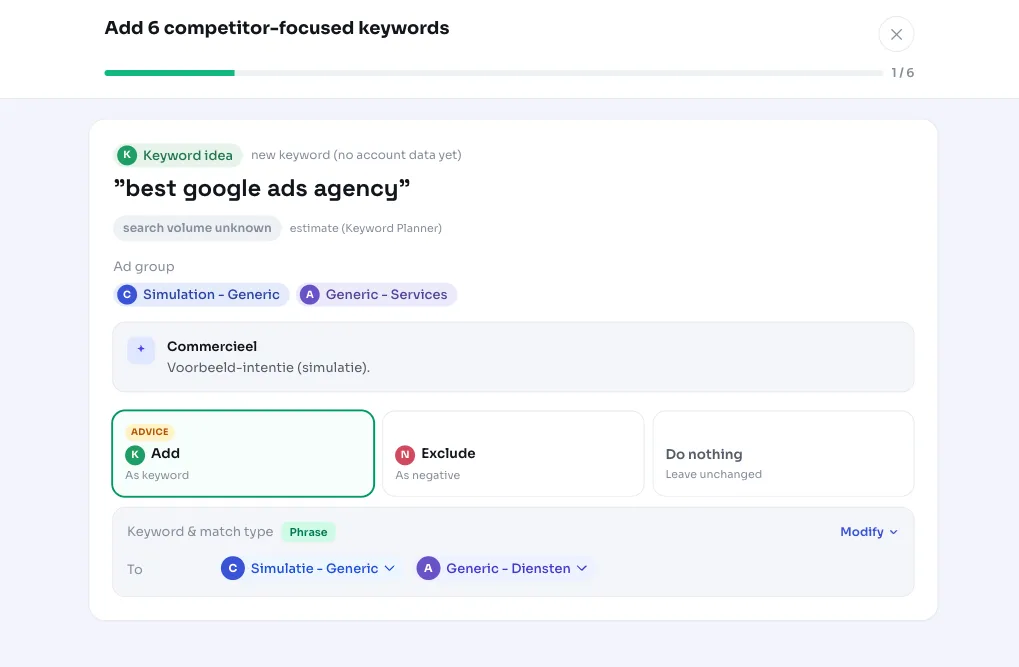
For each suggested keyword, you see where it will land and, where available, the estimated search volume, competition and CPC indicator. That lets you judge which ones fit your offer.
You don't have to take them all. Pick the keywords that make sense, adjust the match type if needed, and apply the recommendation. AdBuilder then creates the keywords in the right ad groups.
- Select per keyword whether you want to add it.
- Choose the match type (phrase match by default, adjustable to exact or broad, for example).
- Applying adds the keywords enabled to your account.
- Reversible: you can remove added keywords afterward.
Frequently asked questions
Am I allowed to bid on competitors in Google Ads?
You're free to advertise on general comparison and alternative keywords (like best, cheapest, or compare). This recommendation deliberately doesn't suggest protected competitor brand names, to avoid trademark issues. Bidding on a competitor's brand name carries its own risks and falls outside what this recommendation proposes.
What match type do the new keywords get?
By default they're added as phrase-match keywords. Before applying, you can adjust the match type per keyword, for example to exact or broad.
Why don't I see a suggestion?
If no ad group converted in the last 30 days, or your account doesn't measure conversions, AdBuilder makes no suggestion. Without a converting group, there's no way to determine where extra traffic would pay off, and we'd rather not add keywords that could waste budget.
Can I remove added keywords again?
Yes. The action is reversible: keywords you've added can be removed again afterward.
How does this relate to adding long-tail keywords?
It works the same way, but with a different focus. Long-tail keywords are more specific, longer variants with buying intent; competitor-focused keywords are about comparing and choosing. Both are only suggested for your best-converting ad groups.