- Category
- Bidding & budget
- What it changes
- Nothing, this is a signal (no one-click action)
- Reversible
- Not applicable, nothing is changed
- Data we use
- This month's spend to date (per day) plus your combined daily budgets
- Typical trigger
- From 20% through the month, with a projection 15% or more below your daily budgets and no sound growth lever
- Priority
- Low (tier 5, budget scaling)
What it signalsYour Google Ads account is staying under budget
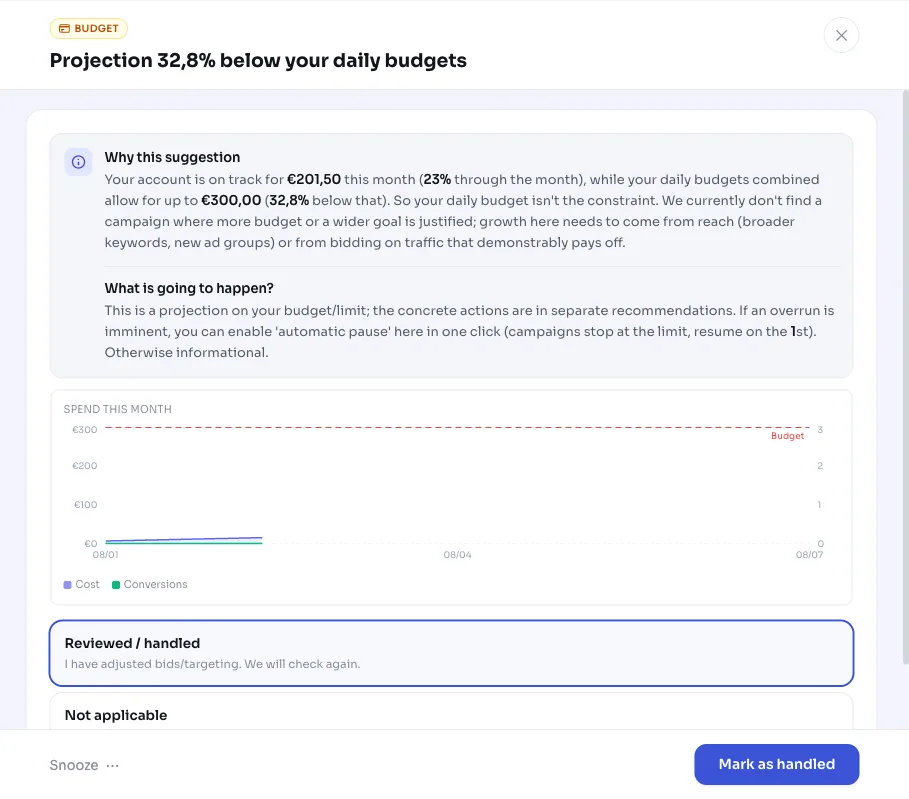
AdBuilder projects your spend for the rest of the month and sees you're coming in well under budget. Specifically, your account is on track for a monthly total that's 15% or more below what your combined daily budgets allow. So budget isn't the constraint.
This signal is the quiet counterpart to the Underused budget recommendation (budget:grow). With that recommendation, AdBuilder finds a concrete lever to get more out of traffic that's paying off. If you get this signal instead, there's currently no campaign where more budget or a looser bid target is justified. The room is there, but the payoff isn't in scaling blindly.
Why it mattersUnused budget is missed growth, but not something to just fix
If you consistently stay under budget, you're leaving impressions, clicks, and possibly conversions on the table. That's a shame. At the same time, blindly raising your daily budget on traffic that isn't demonstrably paying off is just throwing money away.
That's why AdBuilder doesn't flatten this into 'just spend more'. The signal tells you honestly that your budget has room, but that the next step needs to come from reach (broader keywords, new ad groups) or from bidding more precisely on traffic that's worth it. That way you avoid paying more without getting more back.
How it worksFrom spend pace to signal
The benchmark isn't a monthly cap you set yourself, but the sum of your active daily budgets converted to a month (daily budget times 30.4). That's the theoretical maximum Google can spend this month.
AdBuilder totals your spend from the 1st of the month and divides it by your progress through the month to build a monthly projection. That progress is calculated against the last day with real data, since daily figures run about a day behind the calendar. The projection is compared with your derived monthly budget; if it's 15% or more below, you're underspending.
Before this signal appears, AdBuilder first looks for direct, sound levers. If it finds one, you get the actionable budget:grow recommendation. If it doesn't, or if conversion tracking is missing to justify growth, it falls through to this pure projection signal. Nothing is changed in your account.
- Trigger: at least 20% through the month and a projection 15% or more below your daily budgets.
- Daily budget lever (leads to budget:grow): a campaign is losing 10% or more impression share due to its own daily budget and is demonstrably paying off.
- Target lever (leads to budget:grow): a Smart Bidding campaign with at least 10 conversions is hitting its target but losing 10% or more impression share due to position, so the target CPA can go up or the target ROAS can come down.
- Manual bidding (leads to budget:grow): a higher max CPC on efficient keywords that are losing impressions due to position.
- If none of these levers apply, you'll see this signal (budget:pace-under). It shows your projection and the gap with your daily budgets, nothing more.
- As long as the actionable budget:grow recommendation is open, this signal isn't shown separately.
What you can doYour options with unused budget
This is a signal without a button, so the decision is yours. Usually the best next step is to expand your reach or get your tracking in order, so the growth levers can kick in.
- Expand reach: add broader or new keywords, or new ad groups that match what you offer.
- Bid on traffic that's paying off: raise bids specifically where the numbers justify it (and your conversion tracking is solid).
- Check your conversion tracking: without reliable tracking, AdBuilder can't justify growth and will keep showing this signal. Get your tracking right, and the budget:grow levers will come into view naturally.
- Deliberately do nothing: if you want to stay under budget, for example because your reach or offering is limited, that's a perfectly fine choice and you can ignore the signal.
Frequently asked questions
Why am I staying under my budget in Google Ads?
Usually because your daily budgets allow for more than there's demand or suitable traffic for. Your budget isn't the constraint then: there simply aren't enough impressions or clicks worth having at your current keywords and bids. Growth then needs to come from more reach or more targeted bidding, not from a higher budget.
What's the difference with the Underused budget recommendation (budget:grow)?
Both come from the same analysis. Underused budget appears when AdBuilder finds a concrete, sound lever (raising a daily budget, loosening a bid target, or raising a max CPC on traffic that's paying off). This projection signal appears when there's no such lever: you have room, but there's no campaign where spending more is currently a good idea.
Google Ads is underspending, should I just raise my daily budget?
No, not blindly. If you're under budget, a higher daily budget is rarely the fix, since the budget isn't even being used up now. The gain lies in more reach or more targeted bidding on traffic that's demonstrably paying off. Only if a campaign is genuinely being held back by its own daily budget and is paying off does AdBuilder propose an increase (via budget:grow).
Which budget does AdBuilder actually compare?
The sum of your active daily budgets, converted to a month (daily budget times 30.4). That's the maximum Google could theoretically spend this month. So it's not a separately set monthly cap, that's a different setting monitored by the Over budget projection recommendation (budget:pace-over).
Is anything automatically adjusted in my account?
No. This is a diagnostic signal, not a change. AdBuilder doesn't change anything in Google Ads, so there's nothing to undo either. It only shows your projection and the gap with your daily budgets, so you can decide.