- Category
- Ads & assets
- What it changes
- Nothing automatically. Purely a signal with the disapproval reason and a link to Google Ads.
- Reversible
- Not applicable, nothing gets changed in Google Ads.
- Data we use
- Approval status and policy topics per ad from the Google Ads API.
- Typical trigger
- An active ad (RSA) with disapproved status for a non-text reason, such as landing page, trademark or prohibited category.
- Priority
- Critical
What it flagsWhich disapproved ads this recommendation shows
An ad disapproved by Google means it's no longer shown. If the ad is set to 'active' but Google has disapproved it, you're quietly losing reach: the ad group is running on paper, but no traffic comes in.
This recommendation only collects disapprovals you can't fix with a text edit. Think of a problem with the landing page or destination URL, a trademark-protected term, or a prohibited or sensitive category. For these kinds of reasons, rewriting the headline or description won't help; you need to remove the underlying cause or file an appeal.
Disapprovals that can be fixed with text (excessive capitalization, excessive punctuation, offensive language) get a separate recommendation that rewrites the copy to be policy-compliant. That's a different card from this one.
Why it mattersWhy a disapproved ad costs you reach right away
A disapproved ad doesn't run. If it's the only active ad in the group, that ad group grinds to a complete halt, and your budget either goes to other groups or sits unused. This happens without an error message in your daily numbers, so it can easily go unnoticed for weeks.
The reasons covered by this recommendation are exactly the stubborn cases. They don't resolve on their own and require concrete action from you: adjusting the landing page, sorting out the trademark, or filing a formal appeal. The sooner you spot the reason, the sooner the ad can run again.
How it worksHow AdBuilder detects the disapproval
We pull responsive search ads (RSA) from Google Ads where the ad, the ad group and the campaign are all set to 'active', but the approval status is 'disapproved'. For each ad we read the policy topics, the exact policy reasons Google returns.
Based on that reason, we split the cases. Topics related to destination, landing page, URL, malware, trademark, counterfeiting, non-approved or dangerous products and sensitive categories end up in this recommendation as an appeal card. All other (text-based) disapprovals go to the separate rewrite recommendation.
There's deliberately no conversion threshold: this recommendation also runs on accounts without conversion data, since a stalled ad is always urgent. In the priority tier it falls under critical.
- Trigger: RSA with ad, ad group and campaign all active, and approval status disapproved.
- Non-text reason (landing page/URL, trademark, prohibited or sensitive category) or no usable reason at all, and the ad goes into this appeal card.
- If an ad group gets disapproved again after an earlier text fix, we also send it to the appeal path instead of proposing another text fix.
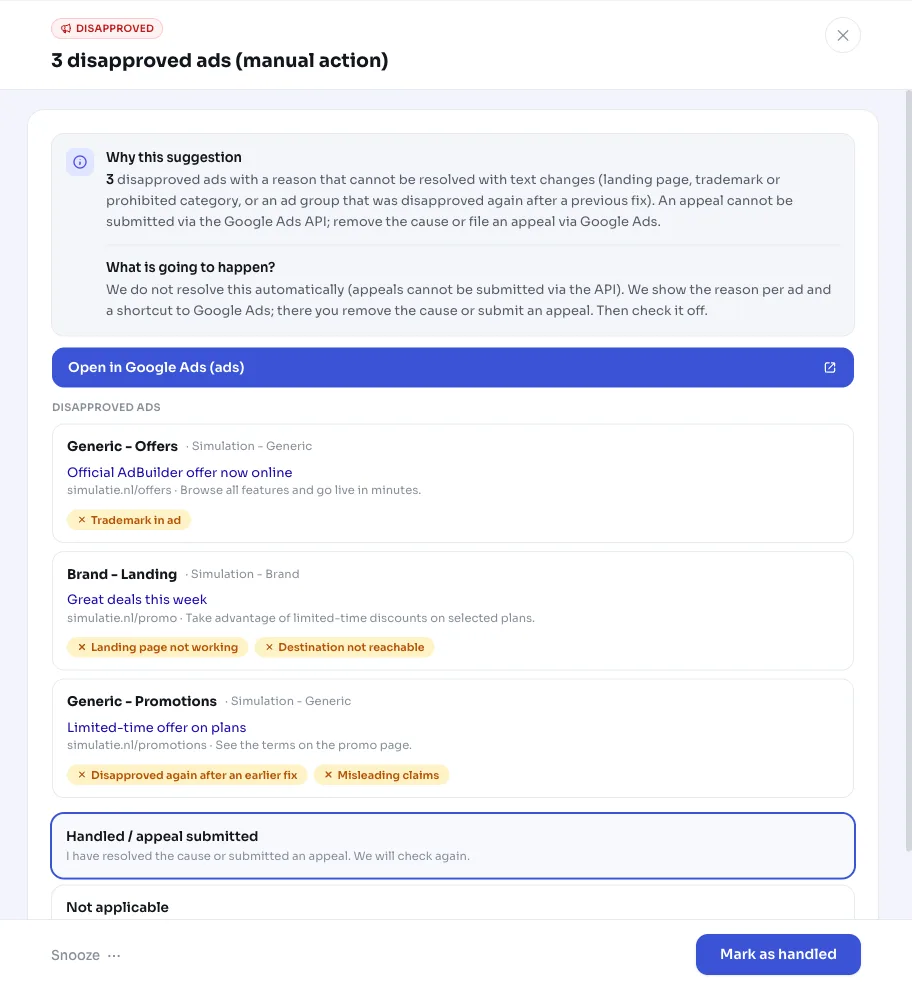
- The card shows up to 12 disapproved ads with their reason; the count in the title reflects all cases found.
- Nothing is changed automatically in Google Ads: appeals can't be filed through the Google Ads API.
What you can doResolve a disapproved ad
The recommendation gives you the disapproval reason and a direct link to the ad in Google Ads for each one. The right action depends on the reason. You mark the card done or snooze it once you've handled it.
- Landing page or URL: check that the destination page works, is reachable and matches the ad, and fix it.
- Trademark: remove the protected term from the ad or arrange permission, then file an appeal.
- Prohibited or sensitive category: adjust the proposition or apply for the required certification with Google.
- Think the disapproval is wrong: file an appeal via the ad in Google Ads (this can't be done from AdBuilder, since the API doesn't support appeals).
- Resolved or in progress: mark the recommendation done or snooze it; once Google approves the ad again, the signal disappears on its own.
Frequently asked questions
Why is my ad disapproved?
Google disapproves an ad when it violates the ad policy. This recommendation collects the reasons you can't fix with text: something with the landing page or URL, a trademark-protected term, or a prohibited or sensitive category. The exact reason is shown per ad in the card.
Can AdBuilder fix the disapproval automatically?
Not for this recommendation. The reasons involved require a change outside the ad copy (landing page, trademark, category) or a formal appeal, and appeals can't be filed through the Google Ads API. If it's a text or style issue, a separate recommendation does propose a policy-compliant rewrite for you.
What's the difference with the 'Fix disapproved ads' recommendation?
That recommendation handles disapprovals that can be fixed with text, like ALL CAPS or excessive punctuation: AdBuilder proposes a rewritten, policy-compliant version. This card is specifically about reasons you can't fix with text, which require manual action or an appeal.
Does the recommendation close automatically once I've resolved it?
Yes. Once Google approves the ad again, AdBuilder sees at the next check that the disapproval is gone and the signal disappears. You can also mark the card done or snooze it yourself while an appeal is in progress.