- Category
- Bids & budget
- What it changes
- Daily budget (+20%), bid target (target CPA +15% or target ROAS -10%) or max CPC on campaigns that perform well
- Reversible
- Yes, every increase can simply be reverted later
- Data we use
- Month-to-date spend versus your daily budget capacity, plus per-campaign conversions, CPA/ROAS and impression share lost (budget and rank) over 30 days ending 3 days back
- Typical trigger
- At least 20% through the month and a projection 15% or more under your daily budget ceiling, with at least one campaign performing well and missing impressions
- Priority
- Tier 5 (budget scaling): runs after cleanup and bid alignment, and only scales what's already working
What it detectsYour Google Ads budget is going unused while campaigns are missing impressions
AdBuilder compares how much you've spent this month so far against the capacity your daily budgets together provide. That ceiling isn't a monthly budget you set yourself, but the sum of your active daily budgets (the theoretical maximum Google is allowed to spend per month). If your account is on track to stay well under that, there's in principle room to get more out of what's already running.
Unused budget isn't a problem on its own. It only becomes one when, at the same time, there are campaigns that perform well and are still losing impressions, because their own daily budget is constraining them or their bid target is set too strict. Then you're leaving impressions (and thus conversions) on the table that you could have captured with a bit more room. This recommendation looks for exactly that combination.
Why it mattersScaling up what performs, not just spending more
More budget is only worthwhile if it goes toward traffic that pays for itself. That's why AdBuilder doesn't look at the account as a whole, but per campaign: is it hitting its goal, how many conversions did it deliver, and is it losing impression share to budget or to position? That way you avoid scaling up a campaign that gets lots of clicks but few conversions.
This recommendation is deliberately late in the order (tier 5, budget scaling). AdBuilder first cleans up waste and aligns your bids; only after that does scaling up come into play. That way you don't hand extra budget to a campaign that actually needs cleaning up first. If you want to grow your Google Ads budget, the safest way is on traffic that's already proven itself.
How it worksThe thresholds and window behind the recommendation
The recommendation only fires once you're at least 20% through the month and your projection lands 15% or more under your daily budget capacity. The projection uses the last day with data in (measurement runs about a day behind), so the estimate doesn't come in structurally too low.
If AdBuilder can't reliably measure your conversions, it skips the entire leverage analysis and leaves only the pacing signal budget:pace-under: a notice with no change. Spending more without measurement isn't something we can justify.
For the analysis itself, AdBuilder uses a 30-day window ending 3 days back, so that lagging conversions don't make your CPA look artificially high. Per enabled search campaign, it looks at conversions, CPA or ROAS and impression share lost, and tests each growth opportunity separately:
- Daily budget is constraining: at least 10% impression share lost to budget. Increase +20%, but only if the campaign performs well (efficient per the budget plan with enough data, otherwise at least 5 conversions and a CPA up to 1.2x the account CPA). Budgets already changed in the last 30 days are skipped, and campaigns with an outstanding waste recommendation are left alone until that's resolved.
- Bid target too strict (target CPA): at least 10 conversions and at least 10% impression share lost to position, while the campaign is already hitting its target CPA. Proposal: target CPA +15%.
- Bid target too strict (target ROAS): same requirement of 10 conversions and 10% rank loss, while achieved ROAS is above target. Proposal: target ROAS -10% (slightly looser).
- Manual bidding: on efficient keywords losing impressions to position, AdBuilder suggests a higher max CPC. This is deduplicated against the standalone bid-increase recommendation.
- For target changes, a learning-phase brake applies: if the bid target or bid strategy has already changed in the last 14 days, AdBuilder won't propose a new target change.
What you can doThe choices with this recommendation
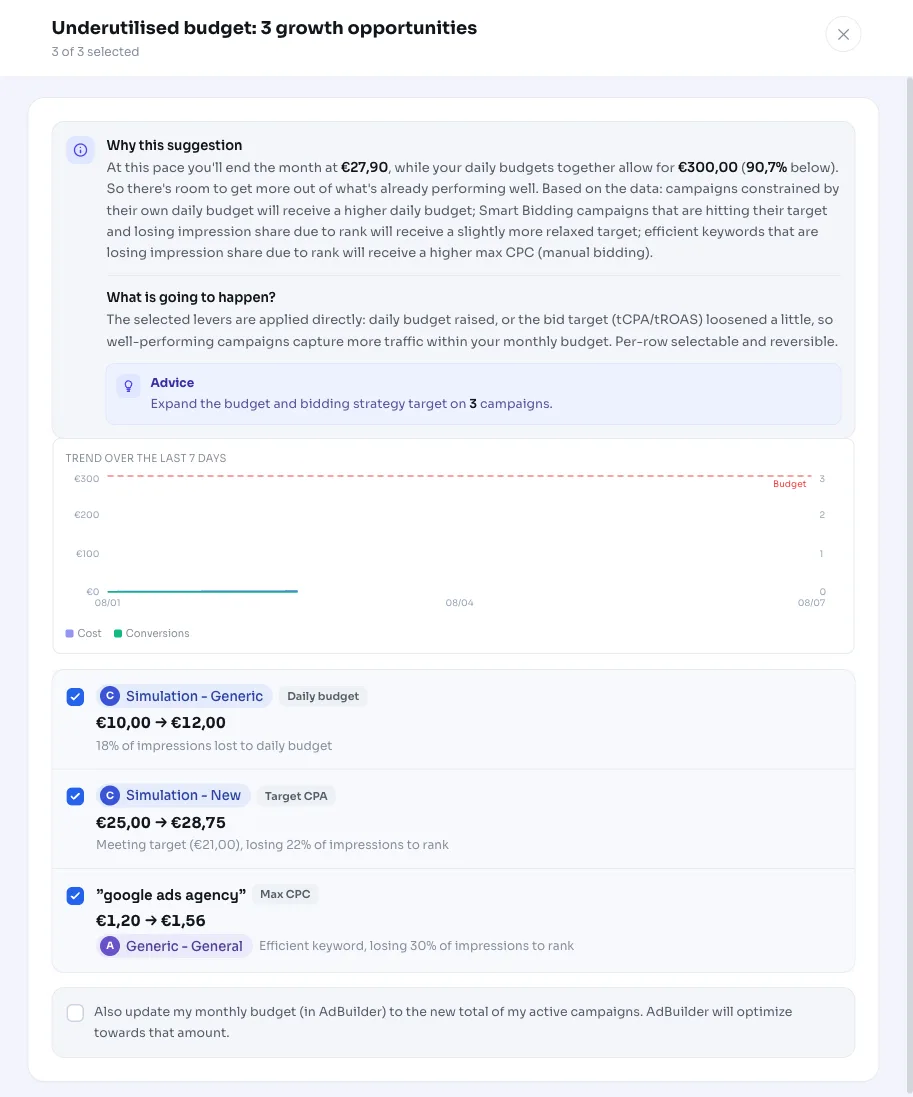
You get a list of concrete growth opportunities, each with the current value and the proposal. You can review and apply them individually; every change can simply be reverted later. If AdBuilder finds no justified lever at all, you'll instead see the signal that you're under your daily budget ceiling, with the tip that growth needs to come from more reach (broader keywords, new ad groups) instead.
- Increase daily budget by +20% on a well-performing campaign that's constrained by its budget.
- Widen target CPA by +15% so a smart bidding campaign hitting its goal can capture more impressions.
- Lower target ROAS by -10% (slightly looser) on a campaign that's exceeding its return target.
- Raise max CPC on efficient keywords missing impressions due to position.
- Do nothing and leave the signal as is, for example if you deliberately want to stay under your ceiling.
Frequently asked questions
When should I increase my budget in Google Ads?
Only when there's traffic that pays for itself and is still being held back. AdBuilder waits until you're at least 20% through the month and 15% or more under your daily budget capacity, and only suggests campaigns that perform well (enough conversions and a healthy CPA or ROAS) and are losing impressions to their budget.
How do I safely scale up my Google Ads campaign?
By only scaling up what's already proven to perform. This recommendation raises the daily budget by +20%, loosens a bid target (target CPA +15% or target ROAS -10%), or raises max CPC, always on campaigns or keywords that are efficient and missing impressions. Waste gets cleaned up first, then scaling comes next.
What does the daily budget ceiling in this notice mean?
That's the sum of your active daily budgets (the theoretical maximum Google is allowed to spend per month), not a monthly budget you set yourself. If your projection is well under that ceiling, there's room to get more out of campaigns that are already performing.
Can I revert an applied increase?
Yes. Any change (daily budget, target CPA, target ROAS or max CPC) can be reverted back to the old value later.
Why do I only see a notice and no concrete change?
That means AdBuilder found no justified lever: no campaign losing budget or position against a healthy CPA, or your conversions can't be reliably measured. You'll then get the budget:pace-under pacing signal with no change, with the tip that growth should come from more reach or from bidding on traffic that's already performing.