- Category
- Tracking & measurement
- What it changes
- Nothing, this is a signal (diagnostic)
- Reversible
- Not applicable, nothing is changed in your account
- Data we use
- Daily impressions per campaign from Google Ads, over a 21-day window
- Typical trigger
- A day that's more than 3.5 median deviations from its own normal, with a median of at least 200 impressions per day
- Priority
- High
What it flagsWhat the recommendation flags
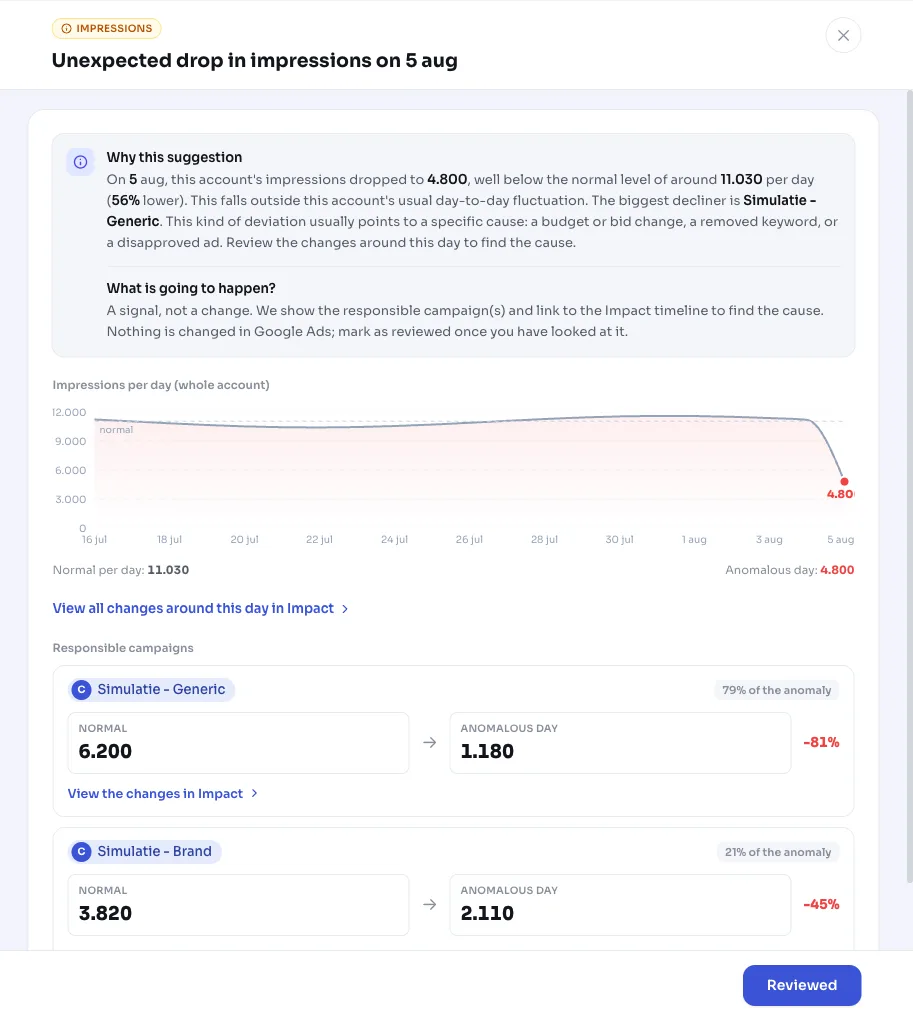
This recommendation watches for one thing: a day when your account's total impressions suddenly deviate sharply from what's normal for this account. That can be a sharp drop (suddenly fewer impressions) or an unexpected spike. We only flag genuine outliers, not the normal day-to-day fluctuation every account has.
Important: this is a diagnostic signal. AdBuilder doesn't change anything in your Google Ads account. The recommendation points out the anomalous day, how far impressions deviated, and which campaign(s) were most behind it, and directs you to the Impact timeline to find the cause.
Why it mattersWhy a sudden change in impressions matters
Impressions are the top of your funnel. If your impressions drop, you're reaching fewer people and missing out on revenue, often for a concrete reason: a depleted budget, a changed bid strategy, a removed or paused keyword, or a disapproved ad.
An unexpected spike in impressions isn't automatically good news either. Extra traffic could be growth, but it could also be expensive or irrelevant traffic from a broadened match type or a new broad keyword. Either way, you want to know quickly that something changed, so you can judge whether it's correct.
How it worksHow AdBuilder recognizes a genuine anomaly
Instead of a fixed threshold like 'down 40%', we look at your account's own spread. We take daily impressions over a 21-day window, determine the normal level (the median) and how volatile the account normally is (the median absolute deviation, or MAD). A day only counts as an outlier if it's more than 3.5 of those deviations away from normal. A volatile account can bounce around quite a bit without triggering an alarm, while a real drop stands out immediately on a stable account.
That's how we avoid false alarms: a declining trend, a day whose prior day was already lower, or an account that naturally swings 40 to 60% per day won't easily clear the threshold. Yet we still don't miss a genuine crash, thanks to a few extra safety nets.
- Window: 21 days of history, with at least 10 data days for a reliable estimate.
- Volume floor: the normal level must be at least 200 impressions per day. We skip micro accounts, where almost any swing is just noise.
- Robust threshold: a day must be more than 3.5 median absolute deviations (MADs) from normal. If an account has almost no spread, the detector falls back to a 40% deviation from the median.
- Crash safety net: a day at or below 15% of the normal level that this account has never seen this low before (below the 10th percentile of prior days) is always flagged, even for accounts that are normally volatile. Recurring patterns, like an account that drops to nearly zero every weekend, don't count as this.
- Fresh days: we skip the last 2 days, since those are still partially synced and would otherwise read as a false drop to zero. We scan the 3 days before that.
- Start of the deviation: if the day before was already just as far in the same direction, the deviation started earlier and we don't flag that day again.
What you can doWhat you can do with this signal
Since the recommendation doesn't change anything, the next step is up to you. AdBuilder gives you the leads: the anomalous day, the percentage by which impressions deviated, and the campaign(s) with the biggest movement (up to 6), each with their own normal versus that day.
- Open the Impact timeline around the flagged day and look for changes: budget, bid or bid strategy, paused or removed keywords, disapproved ads.
- For a drop: check whether the budget ran out, whether a campaign was paused, and whether there's a billing or approval issue.
- For a spike: check whether a broadened match type or new broad keyword is bringing in extra, possibly irrelevant traffic, and whether costs are staying under control.
- Is the change intentional, for example from a deliberate budget increase? Then feel free to dismiss the signal.
Frequently asked questions
Why are my impressions suddenly dropping?
A sudden drop in impressions usually has a concrete cause: a depleted budget, a changed bid strategy, a removed or paused keyword, or a disapproved ad. AdBuilder points out the day and the campaign(s) involved, so you can look back in the Impact timeline for what changed that day.
Does AdBuilder change anything in my account itself?
No. This is a purely diagnostic signal. Nothing is changed in Google Ads; you just get the flag with the anomalous day, the percentage and the campaign(s) behind it. What you do with it is up to you.
Why don't I get a flag for every fluctuation in impressions?
We only flag genuine outliers. A day must be more than 3.5 median deviations from your account's own normal, the normal level must be at least 200 impressions per day, and we skip the last 2 (still partially synced) days. That keeps ordinary day-to-day fluctuation out of view.
From how many impressions does AdBuilder start watching?
The normal level (the median over 21 days) must be at least 200 impressions per day, with at least 10 days of history. If your account is below that, any movement is too noisy to reliably flag as an anomaly.