- Category
- Bidding & budget
- What it changes
- Nothing in Google Ads. You set an internal performance target (CPA, ROAS, conversions or clicks) in AdBuilder.
- Reversible
- N/A (nothing changes in Google Ads). The target is a value you can always adjust or remove.
- Data we use
- Your stored daily data (clicks, cost, conversions and conversion value) over the last 30 days.
- Typical trigger
- No performance target is set and the account had at least 20 clicks in the last 30 days.
- Priority
- Low. It's a measurement and steering layer: it underpins sharper recommendations but doesn't block bidding or scaling.
What it detectsNo performance target yet for this account
AdBuilder sees recent traffic flowing through your account, but no performance target set yet. A performance target is the target value you judge this account by: a target CPA, a target ROAS, a number of conversions or a number of clicks.
As long as that target is missing, there's no reference point. You can see what you're spending and getting, but not whether it's good enough. This recommendation invites you to set that benchmark, with a realistic target value already filled in for you.
Why it mattersNo target, no steering toward results
A performance target is the lens through which you view your Google Ads account. It determines which number you steer on: is your cost per conversion too high, are you getting enough revenue from your ad budget, is the number of conversions growing? Without that number, optimizing stays guesswork.
The target also feeds into the rest of AdBuilder. If you steer on CPA or ROAS, for example, we can check whether your bid strategy actually matches it and whether you're consistently hitting or beating the target. That turns isolated numbers into concrete recommendations tailored to your target.
How it worksWhen this recommendation appears
The detector reads your stored daily data (up to 100 days) and checks whether the account has a performance target set. If not, it counts your clicks over the last 30 days. The recommendation only appears with at least 20 clicks in that period; below that threshold we stay quiet, since there's too little to steer on.
Nothing is sent to Google Ads and nothing is changed: this is purely a signal based on your own figures. The recommendation also doesn't need working conversion tracking to appear. However, the available data determines which target value makes sense: a target on CPA or conversions requires measured conversions, and a target ROAS additionally requires conversion value. Without measurement, a target on clicks is the logical choice.
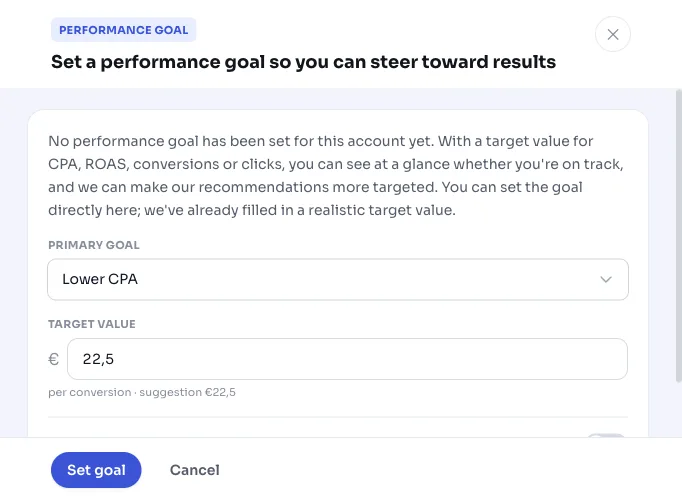
We already fill in a realistic target value, based on your performance over the last 30 days with a modest 10 percent stretch margin, so the target sits just a bit more ambitious than recently but stays achievable.
- Trigger: no performance target set and at least 20 clicks in the last 30 days.
- Lookback window: the last 30 days for the trigger and the proposed target value (from up to 100 days of stored data).
- Target CPA: your average cost per conversion, 10 percent sharper (cheaper). Requires at least 5 conversions in the window.
- Target ROAS: your average conversion value per euro, 10 percent higher. Requires at least 5 conversions and conversion value.
- Target conversions or clicks: your recent number, 10 percent higher (at least 1).
- No Google call, no change in Google Ads: purely a signal from your stored data.
What you can doChoose a target and set it right away
You set the performance target directly from the recommendation card. Choose the metric that matches what you want to achieve with this account; the proposed target value is already filled in and can be adjusted. Which metrics make sense depends on your data: with working conversion tracking, CPA, ROAS or conversions make sense, without tracking you steer on clicks.
The target isn't a one-time, set-in-stone choice. You can always adjust or remove it in your settings. Once you have a target, this recommendation disappears and more targeted advice takes its place, for example to align your bid strategy with the target or to tighten the target if you consistently beat it.
- Target CPA: steer on a maximum cost per conversion (target CPA).
- Target ROAS: steer on a minimum return per euro of ad spend (target ROAS).
- Target conversions: steer on a number of conversions per period.
- Target clicks: steer on a number of clicks, handy if you don't (yet) measure conversions.
Frequently asked questions
How do I set a target for my Google Ads campaign?
Open the recommendation and choose a metric: CPA, ROAS, conversions or clicks. The proposed target value is already ready based on your last 30 days. Adjust it if needed and save. The target applies to the whole account as a steering and evaluation lens.
Which target should I choose: CPA, ROAS, conversions or clicks?
Want control over your cost per conversion? Choose a target CPA. Is it about revenue from your budget? Choose ROAS (target ROAS). Want mainly volume? Choose conversions. Not measuring conversions yet? Then a target on clicks is the logical choice.
Does this change anything about my bid strategy in Google Ads?
No. This recommendation sends nothing to Google Ads and doesn't adjust any bid strategy. The target is an internal value. AdBuilder can later give you a separate recommendation to align your bid strategy with that target, and it only pushes that after your confirmation.
Does this also work without conversion tracking?
Yes, the recommendation also appears without working conversion tracking. A target on CPA, ROAS or conversions only makes sense with measured conversions (and ROAS additionally requires conversion value). Without tracking, you can set a target on clicks.