- Category
- Bidding & budget
- What it changes
- A bid adjustment (bid modifier) per device within a campaign
- Reversible
- Yes, you can revert the bid adjustment to its old value
- Data we use
- Cost, clicks and conversions per device (mobile, tablet, desktop), usually over 30 days
- Typical trigger
- Manual bidding or Maximize clicks plus a device with a sharply diverging cost per conversion
- Priority
- Medium to low (tier 4 of 6: bid adjustments)
What it signalsWhich devices are out of line
Within a search campaign, mobile, tablet and desktop can diverge sharply. On one device, traffic converts cheaply; on another, a conversion costs twice as much. AdBuilder breaks the campaign down by device and compares each device's cost per conversion with the campaign average excluding that device (a leave-one-out benchmark, so a large device doesn't soften its own verdict).
If a device is consistently out of line, AdBuilder flags it and proposes a bid adjustment per device: lower for a device converting much more expensively, higher for a device that's notably efficient. There's also a separate path for a device that generates clicks and cost but zero conversions.
Why it mattersWhy a bid per device makes a difference
Without a bid adjustment, every device gets the same base bid, while the same budget is spread across all devices. If a conversion on mobile costs twice as much as on desktop, you're overpaying on mobile and leaving volume on the table on desktop. A bid adjustment per device corrects your spend without turning a device off entirely.
This recommendation only applies to manual bidding and Maximize clicks. Under Smart Bidding (for example Target CPA or Target ROAS), Google already sets the bid per auction itself and largely ignores fractional bid adjustments per device. There, a full device exclusion is the only real lever, and that's a separate recommendation.
How it worksHow AdBuilder determines the bid per device
The recommendation only looks at active search campaigns on manual bidding or Maximize clicks, with at least 1 conversion in the window. Devices covered are mobile, tablet and desktop. The analysis window is 30 days by default, extending to 60 or 90 days on accounts with limited data. The new bid adjustment is always relative to the current one, since the measured performance already happened under the current bid.
- Zero conversions: the device has at least 5 clicks and has burned enough budget to hit the waste floor (with a CPA reference of roughly 2 expected conversions' worth of cost, otherwise the fixed floor of €10). In that case the bid is halved.
- Enough conversions (10 or more) and at least €10 cost: if the cost per conversion is above 1.4x the campaign average, lower it; if it's 0.7x or below (clearly cheaper), raise it.
- Thin segment (3 to 9 conversions): the verdict runs through a pooled cost per conversion that's pulled toward the campaign average. Only extreme deviations survive that correction, so a fluke doesn't force a bid adjustment.
- The size of the adjustment is dampened with thin evidence (a winner's-curse shrink): little data means a milder adjustment, lots of data means close to the full adjustment.
- The result is rounded to steps of 0.05, with a floor of 0.1 (-90%) and a maximum increase of +50% per step.
- Each recommendation shows at most 20 device adjustments, sorted by cost. Campaigns that already have an open bid adjustment on location, time of day or age are skipped, so bid adjustments don't stack.
What you can doApply, review or undo
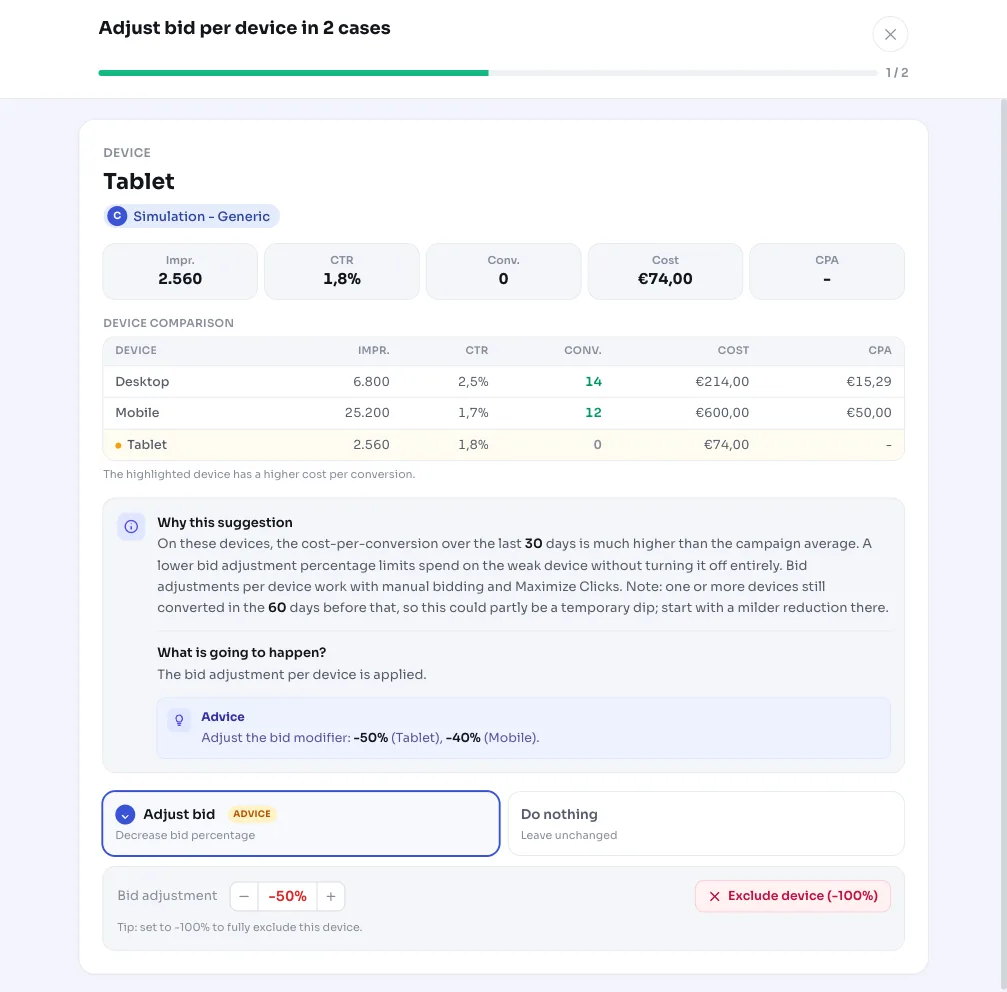
Each row shows a device with its cost, clicks and conversions, the current bid and the proposed new bid, plus all devices in that campaign for comparison and the conversion trend over the last three months. That way you see in context why, for example, mobile in Search generic is being throttled.
- Apply: AdBuilder pushes the bid adjustment per device to Google Ads (it adjusts the existing device criterion or creates one).
- Choose per case: you don't have to apply everything at once, you can decide per device.
- Undo: the adjustment is reversible and restores the old bid.
- Watch the dip note: if a weak device still converted in the 60 days before, it may be a temporary dip and you're better off starting with a milder decrease.
Frequently asked questions
Does a bid adjustment per device also work with Smart Bidding?
No. With a bid strategy like Target CPA, Target ROAS or Maximize conversions, Google ignores fractional bid adjustments per device, since it already sets the bid per auction. This recommendation therefore only appears with manual bidding and Maximize clicks. Under Smart Bidding, a full device exclusion is the only real lever, and that's a separate recommendation.
Does this turn a device off entirely?
No, this is a bid adjustment, not an exclusion. The decrease goes down to at most -90% (floor of 0.1), so the device keeps running but draws less budget. Turning a device off entirely is a different recommendation.
How much data is needed before the recommendation appears?
The campaign must have at least 1 conversion. For a decrease due to zero conversions, a device only counts once it has at least 5 clicks and enough budget burned. For the full cost-per-conversion comparison, 10 conversions are needed; between 3 and 9 conversions, the verdict runs through a more cautious pooled calculation. The window is 30 days by default and longer with limited data.
Can I undo the bid adjustment?
Yes. The recommendation is reversible: undoing it sets the bid per device back to its old value.