- Category
- Tracking & measurement
- What it changes
- Nothing in Google Ads: just a signal with advice
- Reversible
- Not applicable (no change)
- Data we use
- Stored daily numbers (conversions + clicks) over 120 days
- Typical trigger
- Most recent week under 35% of normal and below every prior week, while clicks stayed on par
- Priority
- High: this is the measurement layer and temporarily blocks conversion recommendations
What it flagsWhat this recommendation detects
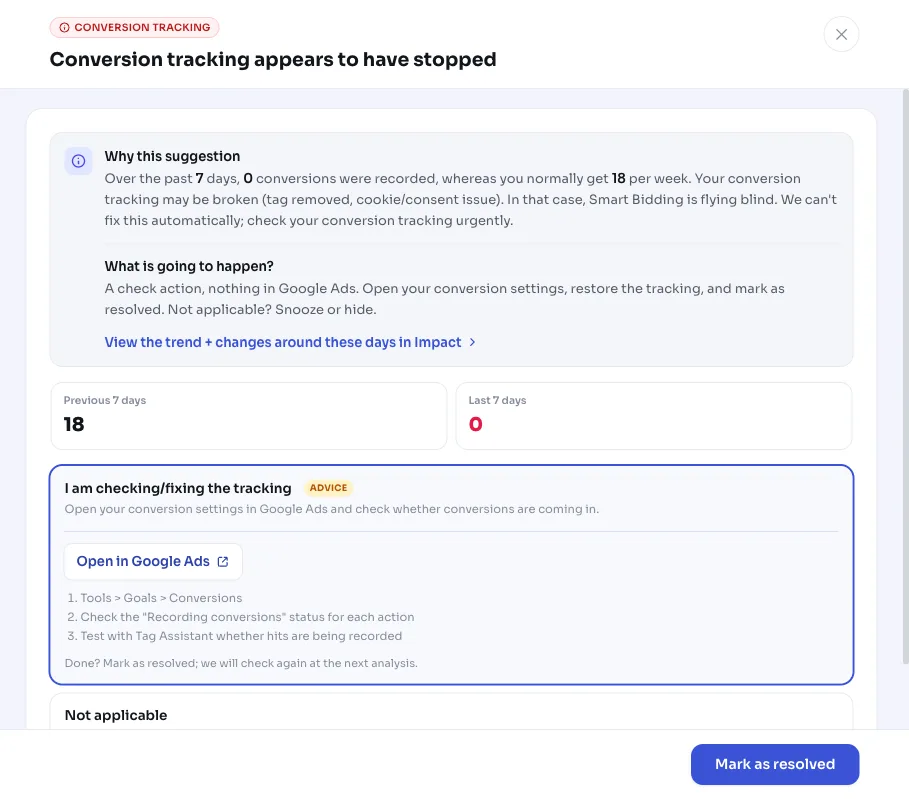
This recommendation fires when your conversion tracking appears to have stopped working. In the most recently measured week, (virtually) no conversions were recorded, while your account normally brings in a lot more per week. Key detail: your clicks stayed on par in that same week. So traffic was coming in as usual, it's just that conversions stopped being counted.
That pattern usually points to a technical measurement issue: a conversion tag that disappeared from the site, a cookie or consent problem, or a change to the website or CMS that broke measurement. This is explicitly a signal, not an automatic fix. AdBuilder doesn't correct anything in Google Ads, and can't, because the fault usually sits in your tracking setup, not in your campaign settings.
Why it mattersWhy stopped conversion tracking does so much damage
When conversion tracking stops working, Smart Bidding flies blind. The bidding strategy thinks your campaigns suddenly stopped delivering and clamps down on bids, while in reality conversions are still happening, they're just not being measured anymore. Every day this continues costs you conversions and hard-earned learning data.
That's why this signal carries a lot of weight. It sits in the measurement layer, the foundation all other judgments rest on. As long as this recommendation is open, AdBuilder blocks conversion-based bidding, scaling and waste recommendations account-wide. Otherwise you might pause healthy keywords or regions based on a count that's simply broken. As soon as you've restored measurement and the recommendation closes, those other recommendations return automatically.
How it worksHow AdBuilder detects a collapsed measurement
The check runs on your own stored daily numbers over the last 120 days (conversions and clicks per day), without putting any extra load on your account. We anchor on the last day with data, not on today's calendar date. Daily numbers lag by a few days, and without that anchor, a normal processing delay would already read as 'measurement stopped'.
We deliberately leave out the last 3 days, since conversions come in with a delay. If you measure via offline import (upload conversion actions, for example CRM batches), that delay is structurally longer and the window shifts to 7 days, so a normal import delay doesn't read as an outage. We then compare the most recently measured week to up to 6 weeks before it, using only weeks that actually contain data.
- The baseline is the median of the baseline weeks. If that's below 5 conversions per week, your account is too thin to judge reliably and we stay quiet (that's normal noise, not an outage).
- The recent week must fall below 35% of that baseline, and also be lower than every individual baseline week, meaning it falls outside your own normal range.
- Traffic guard: clicks in the recent week must be at least 50% of normal. If clicks dropped just as sharply (campaigns paused, budget spent, holiday period), there's no measurement problem, simply no traffic, and we stay quiet.
- Not enough history (fewer than 4 baseline weeks)? Then the check falls back to a simple rule: the previous week had at least 5 conversions and the recent week records at most 10% of that.
What you can doWhat to do if your conversions suddenly stopped
This recommendation doesn't fix anything automatically: it points you to where things are going wrong, so you can resolve it quickly. Review your conversion setup urgently. The recommendation shows a chart of your conversions over the last 60 days, so you can see exactly when the drop began: that moment usually coincides with the cause.
- Check whether the conversion tag is still on your thank-you or confirmation page and firing correctly.
- Check your cookie and consent banner: a changed or stricter setting can block measurement.
- Check whether anything recently changed on the website or CMS (new template, migration, deploy) around the date the drop started.
- Check in Google Ads whether the conversion action itself hasn't been set to inactive or removed.
- Once you fix the measurement issue, the recommendation closes itself on the next check and Smart Bidding's steering recovers.
Frequently asked questions
Why has Google Ads stopped measuring conversions while clicks are still coming in?
That's exactly the pattern this recommendation detects: traffic is coming in, but conversions aren't being counted. The cause is almost always in the tracking, not the campaign. Think of a disappeared conversion tag, a cookie or consent issue, or a website or CMS change that broke measurement.
What if the drop is due to a normal delay in conversions?
We account for that. We leave out the last 3 days because conversions arrive with a delay, and for offline import (upload conversion actions) we extend that to 7 days. We also anchor on the last day with real data, so a normal processing backlog doesn't trigger a false alarm.
Do I lose other recommendations while this one is open?
Temporarily, yes. As long as conversion tracking is demonstrably down, AdBuilder blocks conversion-based bidding, scaling and waste recommendations account-wide, so you don't act on a count that's broken. As soon as you restore tracking and this recommendation closes, those recommendations come back automatically on the next check.
Why don't I see this signal on my small account?
Below roughly 5 conversions per week, measurement is too thin to reliably tell a real drop apart from normal fluctuation. To prevent false alarms, the recommendation deliberately stays quiet in that case.