- Category
- Bids & budget
- What it changes
- Raises the max CPC ceiling (+50%) or lowers the bid floor (-50%); you can also remove the limit entirely
- Reversible
- Yes, you can restore or reset the limit later
- Data we use
- Google's system status for the bid strategy plus 30 days of campaign metrics (cost, clicks, impression share lost to rank)
- Typical trigger
- Google reports the status LIMITED_BY_CPC_BID_CEILING or LIMITED_BY_CPC_BID_FLOOR
- Priority
- Bid intervention (tier 4)
What it detectsGoogle itself marks your bid strategy as limited
Google Ads can give a bid strategy a system status stating it can't bid freely. This recommendation fires when Google reports the status LIMITED_BY_CPC_BID_CEILING (the max CPC ceiling is too low) or LIMITED_BY_CPC_BID_FLOOR (the bid floor is too high) for an active campaign.
In both cases, a manually set limit is holding bids back. The bid strategy can't bid higher or lower than that limit, even if doing so would fit within your goal. So the signal comes directly from Google itself, not from a calculation of AdBuilder's own.
Why it mattersA too-tight bid ceiling costs you conversions, not budget
A max CPC ceiling is meant as a safety net against outliers, but if it's set too tight, it stops smart bidding from doing its job. The strategy can't bid high enough to win auctions that would still fit within your target CPA or target ROAS. You're missing out on impressions and conversions purely because of the limit, not because your budget ran out.
The reverse holds for a bid floor that's too high: it chokes off clicks that are actually too expensive and limits your reach. Because this is a status from Google itself, it's a reliable sign that the set limit is getting in the way and deserves attention.
How it worksWhich campaigns AdBuilder picks up
AdBuilder looks at all active (ENABLED) campaigns over a 30-day window and keeps only the campaigns for which Google reports the status LIMITED_BY_CPC_BID_CEILING or LIMITED_BY_CPC_BID_FLOOR. There's deliberately no conversion threshold: this is a system status, not a conversion calculation of our own, so no conversion-lag margin is needed.
Because raising the ceiling costs money (your CPCs can rise by around 50%), there's an evidence gate. On channels that report impression share lost to rank (Search and Shopping) that figure must be at least 5%, otherwise there's no proven volume gain and the recommendation stays quiet. On channels without that figure (like Display or Video) Google's status is the only evidence, and the text doesn't mention a percentage.
The ceiling can sit in two places: on the campaign itself (with target spend or target impression share) or on a linked portfolio strategy (like maximize conversions, conversion value, target CPA or target ROAS). A bid floor only exists on portfolio strategies. If a portfolio target-calibration recommendation is already open for that same strategy, this recommendation defers: only one intervention per strategy goes through at a time.
- Lookback window: 30 days, active campaigns only.
- Trigger: Google status LIMITED_BY_CPC_BID_CEILING or LIMITED_BY_CPC_BID_FLOOR.
- Evidence gate on Search/Shopping: at least 5% impression share lost to rank.
- A shared portfolio ceiling affects all linked campaigns; AdBuilder shows the heaviest-hit campaign as the representative.
- At most 10 campaigns per recommendation, sorted by impression share lost.
What you can doAdjust or remove the limit
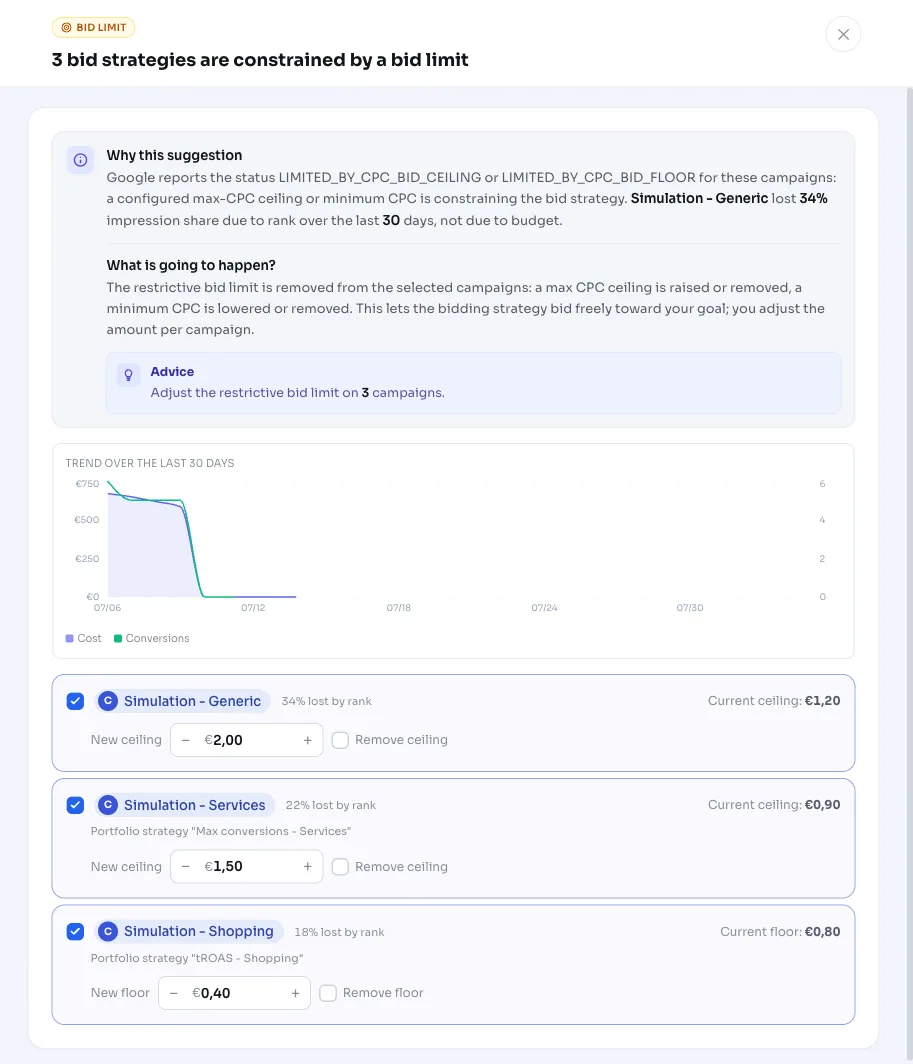
AdBuilder proposes a value per campaign that you can adjust in the modal. You decide the final amount yourself, or you can remove the limit entirely. The change is reversible: you can restore the limit manually later.
- Max CPC ceiling: default proposal is +50% (rounded), giving the strategy more room.
- Remove ceiling: drop the limit entirely if you want smart bidding to bid completely freely.
- Bid floor: default proposal is -50% (rounded to whole cents). If the new floor comes out below EUR 0.05, the floor is removed.
- You adjust the amount per campaign; nothing is applied automatically without your choice.
Frequently asked questions
What is a bid limit in Google Ads?
A bid limit is a boundary you set yourself on what a bid strategy is allowed to bid per click: a max CPC ceiling (the maximum) or a bid floor (the minimum). If Google reports the status LIMITED_BY_CPC_BID_CEILING or LIMITED_BY_CPC_BID_FLOOR, the strategy is stuck at that limit and can't freely pursue its goal.
Will this increase my costs?
Raising the ceiling can make your CPCs go up, by around 50% in the default proposal. That's why the recommendation only fires on Search and Shopping if impression share is genuinely being lost to rank (at least 5%). You decide the final amount per campaign yourself.
Does this also work for portfolio bid strategies?
Yes. The max CPC ceiling can sit on the campaign itself or on a linked portfolio strategy like target CPA or target ROAS. A bid floor even only exists on portfolio strategies; we adjust it there in that case.
Can I revert this?
Yes. It's a setting on the campaign or bid strategy that you can restore or adjust again manually later.