- Category
- Search terms & negatives
- What it changes
- Adds a campaign negative (negative keyword as a phrase) to the PMax campaign for each wasteful search theme
- Reversible
- Yes, you can remove any added negative again
- Data we use
- campaign_search_term_insight (clicks and conversions per category) plus an estimated Search Network CPC, over 30 days
- Typical trigger
- Search theme with 0 conversions, at least 5 clicks, and estimated cost above the floor (>= max(EUR 10 or EUR 25; 2x reference CPA))
- Priority
- Waste tier: runs after serving, policy, and structure issues are resolved
What it flagsSearch themes in Performance Max that cost money without converting
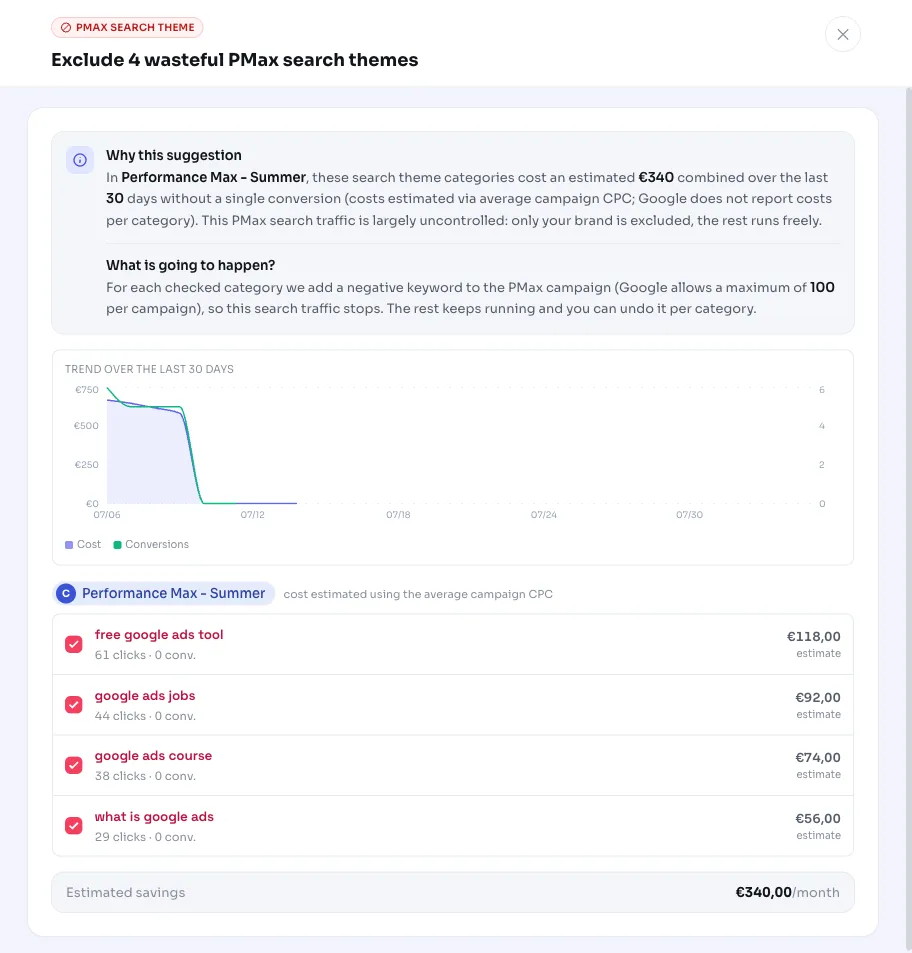
Performance Max decides for itself which searches your ads show up for. In the campaign_search_term_insight report, Google groups those searches into categories (search themes), with clicks, impressions, and conversions per theme. This recommendation looks at that report for themes that do bring in clicks but deliver zero conversions over the measurement period.
Themes like that are uncontrolled traffic: you're paying for the clicks with nothing to show for it. Because Performance Max offers few levers by default to steer search traffic, this often goes unnoticed. AdBuilder surfaces it and pairs it with a concrete action.
Why it mattersUncontrolled PMax search traffic leaks budget
In a regular Search campaign, you steer away waste with negative keywords based on the search terms report. In Performance Max you don't have that control by default: the channel decides where the budget goes on its own. A search theme that racks up dozens of clicks without converting can run for months without anyone stepping in.
Excluding wasteful search themes stops that leak and puts the budget toward traffic that does perform. If you want to prevent waste in Performance Max, this is one of the few places where you can target the search portion without touching the rest of the campaign.
How it worksHow AdBuilder identifies a wasteful search theme
The recommendation only runs on ENABLED Performance Max campaigns that have been running for at least 14 days (new campaigns are still ramping up and are skipped). For each campaign, we pull the search theme report over a 30-day measurement window. Google reports clicks and conversions per search theme, but not cost. We estimate that cost using the campaign's average Search Network CPC (estimated cost = clicks x search CPC). If that's not available, the estimate falls back to the blended CPC across all PMax channels combined, and the text explicitly notes that it's a rough estimate.
A search theme is flagged if it meets all of these conditions: 0 conversions and virtually no conversion value in the measurement window, no conversions in the preceding period (together a 90-day lookback window; this is the dip protection, so a theme that converted before isn't accidentally cut), it's not a brand category, it isn't already excluded, and it has at least 5 clicks.
On top of that, the estimated cost has to clear the waste threshold. That threshold is CPA-relative: cost must be at least 2x the reference CPA (the reference CPA is the campaign's cost per conversion, or the account average if the campaign has too little data), with an absolute floor of EUR 25 (EUR 10 on small, low-volume accounts). This way the threshold scales with your account size and the recommendation doesn't flag small noise.
- Only ENABLED PMax campaigns, active for at least 14 days
- Measurement window: 30 days; dip protection looks at the preceding period (90 days total)
- 0 conversions in the window, no conversions in the preceding period, not a brand theme
- At least 5 clicks on the theme
- Estimated cost >= max(EUR 10 or EUR 25 floor; 2x reference CPA)
- Requires conversion tracking; maximum 10 themes per recommendation, from at most 5 campaigns
What you can doExclude wasteful search themes with a campaign negative
For each flagged theme, AdBuilder suggests a campaign-level negative keyword for the PMax campaign, as a phrase matching the category label. You can apply them all at once, or choose per theme. The action is reversible: any added negative can be removed later.
Important to know: Google only provides the category label, not the individual searches within that theme. The negative therefore only blocks searches that literally contain that label; traffic from the same theme using different words still gets through. The estimated cost of a theme is therefore an upper bound on what you save, not a guarantee. Check after about two weeks whether the cost actually drops.
- Apply all: add all suggested campaign negatives at once
- Choose per theme: exclude only the themes you recognize as waste
- Ignore: leave a theme as is if you want to keep serving it deliberately
- Undo later: remove an added negative to let the theme back in
Frequently asked questions
What are search themes in Performance Max?
Performance Max groups the searches your ads show up for into categories (search themes). The search theme report shows clicks, impressions, and conversions per theme. Google only provides the category label, not each individual search.
How do I prevent waste in Performance Max?
One of the few targeted levers is a campaign negative per search theme. This recommendation identifies themes that cost clicks without converting and suggests a negative keyword for them. That way you cut off wasteful search traffic without touching the rest of the campaign.
Why is the cost saved an estimate?
Google doesn't report cost per search theme, so AdBuilder estimates it using the campaign's average Search Network CPC. On top of that, the negative only blocks searches that literally contain the label. The amount shown is therefore an upper bound, not a guaranteed saving.
Can I let an excluded search theme back in?
Yes. You can remove any added negative keyword, after which the theme is included again. The action is fully reversible.
Why are themes that converted before skipped?
There's dip protection built in: if a theme converted in the preceding period (together a 90-day lookback window), the recommendation skips it. That way you don't exclude a theme that's temporarily in a dip but normally does deliver results.