- Category
- Ads & assets
- What it changes
- Publishes a corrected ad and pauses the original; only the wrong word changes
- Reversible
- Yes, the new ad is deleted and the original reactivated
- Data we use
- Copy of active responsive search ads (headlines, descriptions, paths); no performance figures
- Typical trigger
- An AI check finds a clear spelling mistake in a regular word
- Priority
- Quality and policy layer (layer 1)
What it flagsWhat this recommendation flags
A spelling mistake in ad copy stands out and undermines trust. This recommendation is about exactly that: a spelling mistake or typo in the ad copy of an active ad. AdBuilder has an automated proofreader check your headlines and descriptions and only flags obvious mistakes in regular words, such as a misspelled word, a missing or doubled letter, or an obvious typo.
The check only looks at active responsive search ads in active ad groups and active campaigns. Ads that aren't running anyway stay out of scope. That way you only get corrections for copy that's actually being shown to visitors right now.
Why it mattersWhy fixing spelling mistakes in ads is worth it
Spelling mistakes look sloppy and cost trust with people who see your ad. On top of that, the quality of your ad copy factors into how Google rates your ad, so copy with mistakes can drag down your quality and therefore your position and costs.
The tricky part is that spelling mistakes are easy to miss, especially with lots of ads and ad groups. Checking your ad copy for mistakes is exactly the kind of task that keeps getting put off. This recommendation takes that work off your hands and points you straight to the spots that actually need fixing.
How it worksHow AdBuilder checks your ad copy
AdBuilder pulls the copy from all your active responsive search ads and has an automated proofreader review it. To keep cost and turnaround manageable, each run checks a maximum of 60 texts. If you have more, a cursor moves through the list per run, so consecutive runs check the next 60 texts until everything has been covered. Existing corrections from earlier runs stay in place as long as the mistake still literally appears in the ad.
The proofreader is deliberately set to be cautious: when in doubt, it flags nothing, better too little than too much. Brand names, product names and other proper nouns are never flagged as mistakes. The same goes for a capitalized word mid-sentence, ALL CAPS, abbreviations, missing punctuation and deliberate style choices. To protect your brand further, AdBuilder derives the brand name per campaign from the domain of the final URL, so it proofreads against the right brand for accounts with multiple brands.
Before a correction becomes a suggestion, it goes through a series of hard checks. The wrong word must literally appear in the ad, the replacement happens on a word boundary, the suggestion must genuinely differ from the wrong word (no no-ops), and it may only be the correction itself, so no explanation, brackets or quotation marks. Separate words are never glued together, and words that belong to a brand name are left alone. Per ad you get one recommendation listing the corrections found (from wrong to right).
- Source: only active responsive search ads in active ad groups and campaigns.
- Batch: up to 60 texts per run, with a rotating cursor across large accounts.
- Brand protection: brand names, product names and proper nouns are never corrected.
- Safety net: the wrong word must literally be present and the correction must be a real change.
- Scope: up to 25 ads with corrections per account at a time.
- No conversion requirement: the check runs independently of performance or conversion figures.
- Ad groups with a running A/B test are skipped.
What you can doWhat you can do with the recommendation
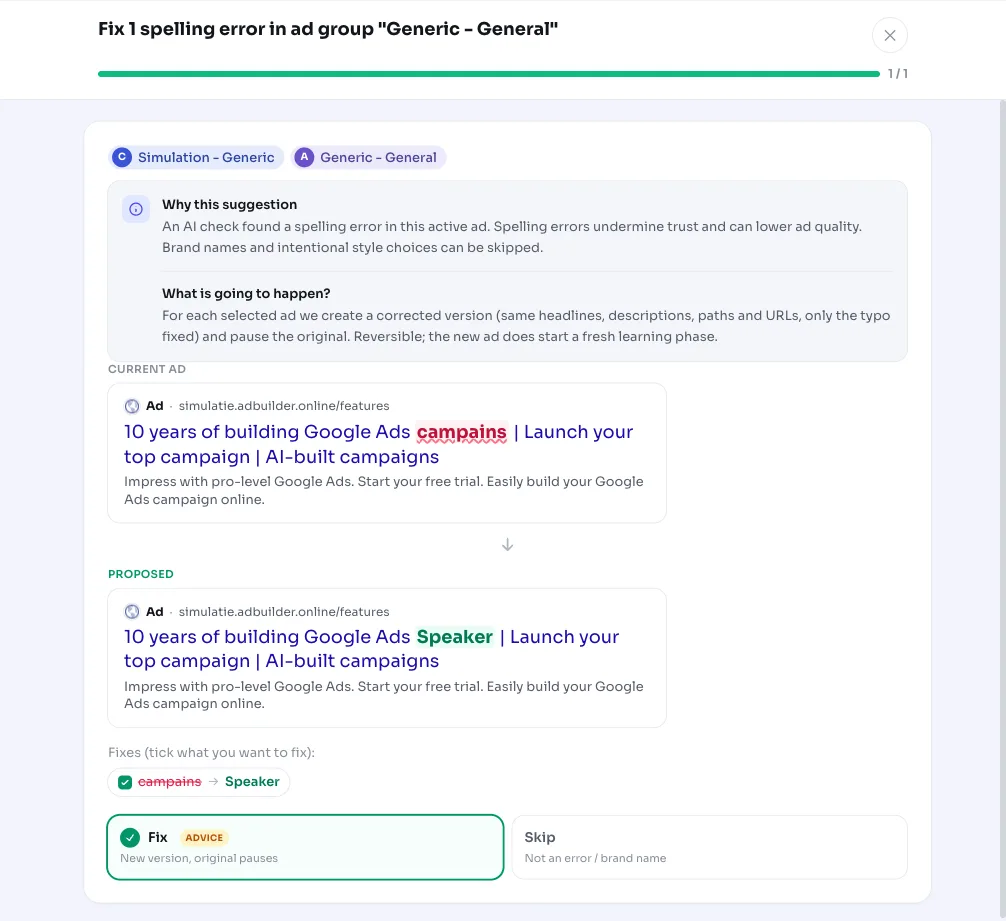
Each recommendation shows, per ad, which words the check wants to correct, along with the number of mistakes and the ad group name in the title. You see the original copy next to the corrected version, so you know exactly what changes before you apply anything.
If you apply the correction, AdBuilder builds a new, corrected version of the ad with only the wrong word replaced (headlines, descriptions, paths, pinning and the final URL stay the same), publishes it and pauses the original ad. This is reversible: undoing it deletes the new ad and reactivates the original.
- Choose per correction: check the corrections you want and leave the rest.
- Edit it yourself: adjust headlines, descriptions or paths manually before publishing.
- Apply as an A/B test: run the corrected ad alongside the original in a test instead of replacing the original directly.
- Skip it: if it's a brand name or a deliberate style choice, ignore the suggestion; dismissed recommendations don't come back.
Frequently asked questions
Does AdBuilder also correct my brand name or a deliberate misspelling?
No. Brand names, product names and proper nouns are never flagged. AdBuilder also derives your brand name per campaign from the domain of the final URL, so words tied to your brand are left alone. If you're still unsure, you can simply skip the suggestion.
Does the correction change the rest of my ad?
No. Only the wrong word is replaced. All other headlines and descriptions, the paths, the pinning and the final URL stay exactly the same. AdBuilder builds a new version of the ad with just that one change.
Can I undo an applied spelling correction?
Yes. When you undo it, AdBuilder deletes the new, corrected ad and turns the original ad back on.
Why don't I see all the spelling mistakes in a large account at once?
The check works per run with a batch of up to 60 texts to keep cost and turnaround manageable. On larger accounts a cursor moves through the list, so consecutive runs pick up the next texts until everything has been checked. Up to 25 ads with corrections are reported at a time.
Which ads are checked for mistakes?
Only active responsive search ads in active ad groups and campaigns. Paused ads and ad groups with a running A/B test are skipped.