- Category
- Shopping & feed
- What it changes
- Nothing automatically, this is an informational recommendation without a push to Google Ads
- Reversible
- Not applicable, nothing is changed
- Data we use
- shopping_performance_view over 365 days plus the account-wide Shopping CPA
- Typical trigger
- A SKU with 0 conversions and costs above the floor over a full year
- Priority
- Waste (tier 3)
What it flagsProducts that cost money without a single sale
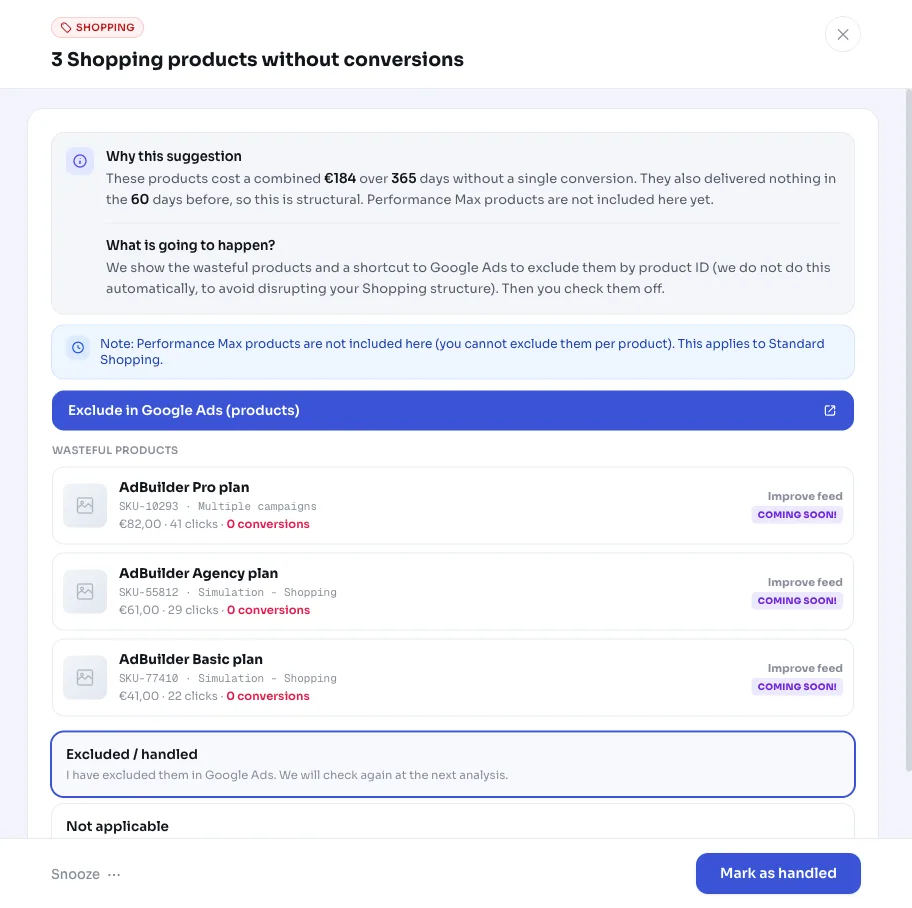
A Google Shopping campaign often runs an entire product feed. Some products drive clicks and sales, others just cost budget. This recommendation looks for the second group: SKUs that incurred costs over the past 365 days, but delivered 0 conversions and virtually no conversion value (under €1).
AdBuilder looks at products in standard Shopping campaigns that are ENABLED. For each product (item ID), cost, clicks, conversions, and conversion value are totaled over the full year, even if the same product runs in multiple campaigns. If a SKU spans multiple campaigns, it gets the Multiple campaigns label.
This is an informational recommendation: AdBuilder shows the list and the costs, but doesn't change anything in your account itself. You decide what happens with each product.
Why it mattersWaste in the feed otherwise goes unnoticed
Waste is hard to spot at the product level. The campaign total can look fine while a handful of SKUs are quietly eating up budget that should have gone to your selling products. Especially with a large product feed, you won't manually check every SKU.
By grouping the zero-conversion products together with their annual cost, you see at a glance which products in your Google Shopping campaign are burning money without giving anything back. That turns it into a concrete decision instead of guesswork: improve the feed, lower the bid, or remove the product from the campaign.
How it worksWhich products cost money without selling
AdBuilder pulls product performance from shopping_performance_view over a 365-day window. That long window is deliberate: products are seasonal. A winter SKU shouldn't be flagged as waste in summer. A full year covers every season exactly once, so 0 conversions over that year is structural, not a temporary dip.
A product is flagged if it has 0 conversions and a conversion value under €1, and the cost is high enough to genuinely count as waste. That cost threshold (wasteThresholdMet) works like this:
- If your Shopping account has conversion data: the product's cost must be at least max(floor, 2 x the account-wide Shopping CPA). Only once a product has cost enough for roughly two expected sales without delivering one does it count.
- The absolute floor depends on account size: €10 for low-volume accounts and €25 for medium and high-volume accounts.
- If the account has fewer than one Shopping conversion for the whole year (no CPA reference), the check falls back to at least 5 clicks and roughly €61 in cost (the base floor of €5, scaled to the annual window: €5 x 365 / 30).
- Only campaigns with status ENABLED count. Performance Max products sit in a separate view and aren't covered here yet.
What you can doUsing the list and cleaning up
AdBuilder shows the 20 most expensive zero-conversion products with their annual cost and the campaign they run in. If more products meet the threshold, you'll see how many there are; those come up in a later analysis. The estimated monthly amount under the alert is the annual waste converted to a month.
Since this is advice, not an automatic change, you decide per product what happens:
- Improve the feed: a weak title, missing attributes, or a poor product image could be why a product draws clicks but doesn't sell.
- Lower the bid: keep the product running, but let it eat up less budget.
- Exclude or pause the product: remove a SKU that structurally delivers nothing from the Shopping campaign.
- Leave it as is: sometimes a product is deliberately a loss leader or supports your range. In that case, just ignore the alert.
Frequently asked questions
Which products cost money without selling?
Products with 0 conversions and a conversion value under €1 over the past 365 days, where the cost is above the threshold. With conversion data, that's at least twice the account-wide Shopping CPA (and at least the €10 or €25 floor). Without conversion data, it's at least 5 clicks and roughly €61 in cost.
Why does AdBuilder look back a full year?
Because products are seasonal. Over 30 or 90 days, a winter product would be unfairly flagged as waste in summer. A 365-day window covers every season once, so 0 conversions over that year is structural.
Does AdBuilder change my Google Shopping campaign itself?
No. This is an informational recommendation. AdBuilder shows the wasteful products and the cost, but doesn't change anything in your account. You decide whether to improve the feed, lower the bid, or exclude the product.
Why aren't my Performance Max products listed?
This recommendation reads shopping_performance_view, which only covers standard Shopping campaigns. Products running through Performance Max sit in a separate view and aren't covered here yet.
Why do I only see 20 products when more are wasting money?
AdBuilder shows the 20 most expensive products so the amount in the alert matches the list. If there are more, you'll see how many; those come up in a later analysis.