- Category
- Targeting & structure
- What it changes
- Adds negative location criteria at the campaign level (the chosen regions are excluded)
- Reversible
- Yes, an excluded region can be removed again later
- Data we use
- geographic_view by presence (where someone actually was), a 30-day window ending 3 days back, plus 60 days before that as a dip check
- Typical trigger
- A region with 0 conversions, at least 5 clicks and cost above max(floor of €10 or €25, 2x reference CPA)
- Priority
- Layer 3 (waste)
What it flagsRegions costing money without giving anything back
AdBuilder looks per campaign at how each region where your ads showed is performing. If a region does drive clicks and cost, but produces 0 conversions, it becomes a candidate for exclusion. This is about locations where people were actually present (presence, not just interest), so you don't exclude an area purely because someone once searched for it.
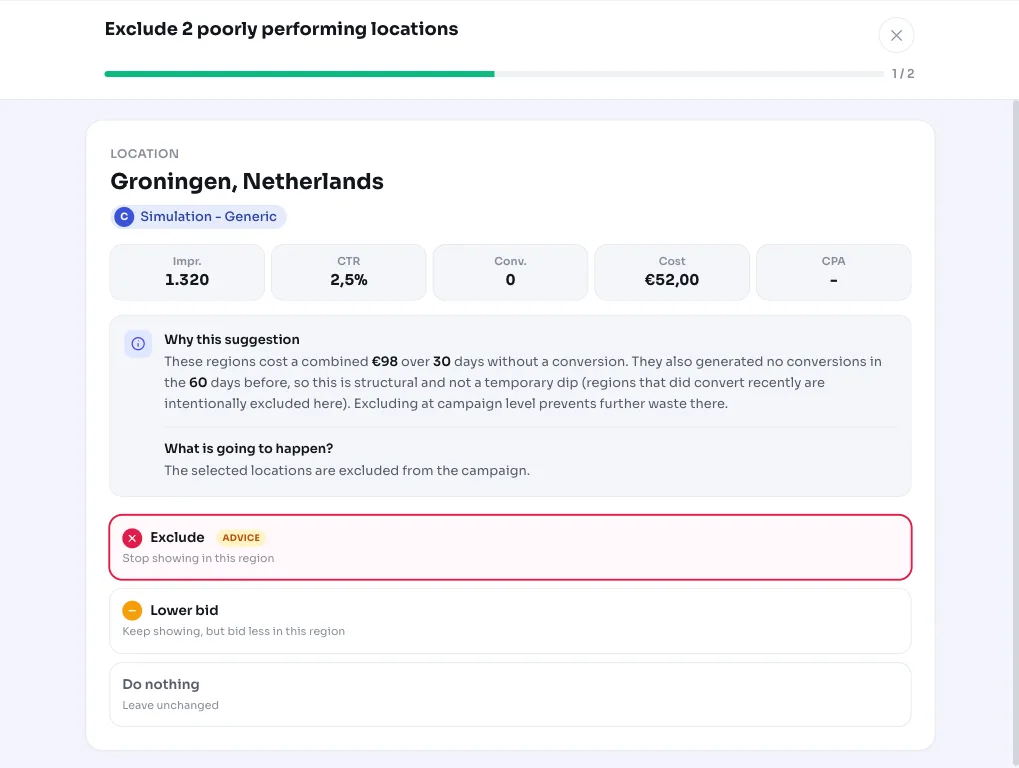
The recommendation appears as Exclude N underperforming locations and lists the regions involved along with their cost. That way you see at a glance where your money is going without anything in return.
Why it mattersA few dead regions can quietly drain your budget
If you target a broad area, not every region performs equally. Some areas draw clicks but never convert, for example because you don't deliver there or the traffic simply doesn't buy. That budget could have been put to better use elsewhere.
Excluding a location is a fairly significant move: you cut off traffic from that region entirely for that campaign. That's why AdBuilder is cautious here and only flags a region once the waste is structural and material, not after a single off week.
How it worksWhen a region surfaces as a candidate
For each campaign and region combination, AdBuilder totals clicks, cost and conversions over the analysis window. By default that's the last 30 days, ending 3 days ago so late conversions can still come in. On small accounts, this window automatically shifts to 60 or 90 days, since such an account would almost never hit the cost threshold within 30 days, precisely where a dead region is structurally burning budget.
A region only qualifies if all of the conditions below are met. The cost threshold is relative: with conversion data in the campaign, the binding term is twice the reference CPA, but only once that's higher than the fixed floor. Without conversion data, the check falls back to a fixed minimum.
- 0 conversions and virtually no conversion value (below 1) within the window.
- At least 5 clicks, so '0 conversions' is meaningful and not just noise.
- Cost above the binding threshold: with conversion data, max(floor, 2x the campaign's reference CPA), where the floor is €10 on small accounts and €25 on larger ones; without conversion data, at least 5 clicks and at least €5 (this amount scales with the window length).
- No temporary dip: if the region did convert in the 60 days before the window, it's left out.
- Not already excluded, and the exclusion may not cover your entire target area (which would shut the campaign down).
What you can doSelect and exclude regions
AdBuilder shows the candidate regions sorted by cost (most expensive first, up to 25 at a time) with clicks and the amount lost per region. You decide which ones to exclude: each item on the list can be checked individually, so you don't have to take them all at once.
When you apply the recommendation, AdBuilder sets the chosen regions as negative locations on the relevant campaign. That's reversible: if something changes or you want a region back, you simply remove the exclusion later. Not sure about a region? Leave it be; as long as it keeps costing money without converting, the recommendation will come back on its own.
- Review the list of suggested regions and the cost per region.
- Check the locations you want to exclude (selectable per item).
- Apply: AdBuilder sets them as negative locations at the campaign level.
- Would rather adjust than exclude? Consider a lower bid for that region first instead of a full exclusion.
Frequently asked questions
How do I exclude a location in Google Ads?
In Google Ads, you add an exclusion via the campaign's location settings. AdBuilder takes that work off your hands: if a region structurally drives clicks and cost without converting, you set the exclusion with one click, and AdBuilder sets the region as a negative location on the campaign.
Does AdBuilder exclude a region after just one bad week?
No. A region needs at least 5 clicks and cost above the threshold, 0 conversions over the entire window, and also no conversions in the 60 days before that. This prevents a temporary dip from leading straight to an exclusion.
Can I bring back an excluded location?
Yes. An exclusion is a negative location criterion that you can simply remove again later. The action is fully reversible.
Why don't I see this recommendation even though a region is underperforming?
Usually because the cost is still below the threshold (twice the reference CPA, or the fixed floor of €10 on small accounts and €25 on larger ones), the region had too few clicks, or it did convert in the 60 days before. This recommendation also stays away if your conversion tracking is off, since then we can't reliably determine '0 conversions'.