- Category
- Search terms & negatives
- What it changes
- Adds the search term as an exact negative keyword in the losing campaign
- Reversible
- Yes, you can remove the exclusion again
- Data we use
- Search terms report (clicks, cost and conversions per campaign) plus the live status of your campaigns and existing negative keywords
- Typical trigger
- Same search term serves in 2+ active Search campaigns; the loser pays at least 2x the cost per conversion of the winner, or got 0 conversions above the cost floor
- Priority
- Medium (waste layer)
What it flagsWhen campaigns compete with each other for the same search term
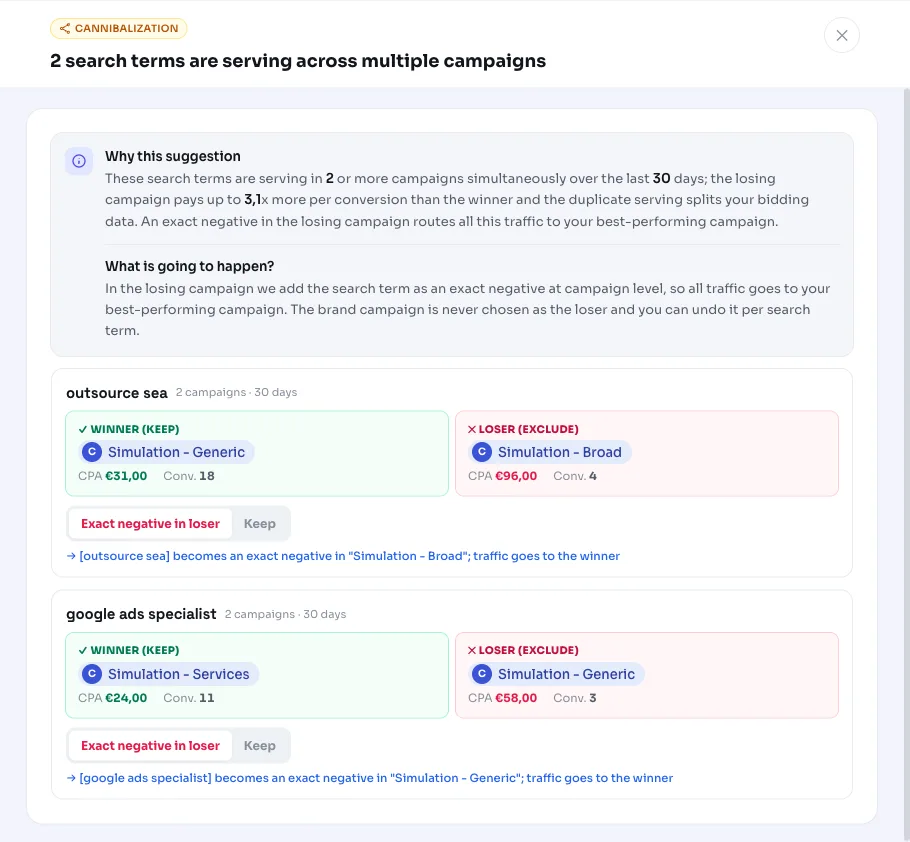
AdBuilder groups your search terms across all your active Search campaigns. As soon as the exact same search term picks up traffic in two or more campaigns at once, cannibalization occurs: your campaigns are bidding on the same search and effectively competing with each other in the auction.
This is different from a duplicate keyword within the same campaign. Here it's about overlap between different campaigns, where the search terms report shows that one search converts nicely in one campaign and much more expensively or not at all in the other. We call that other campaign the loser.
Why it mattersDuplicate serving splits your data and sends traffic to the wrong place
If the same search term serves in multiple campaigns, Google splits your clicks across those campaigns. As a result, no single campaign gets the full picture, and the automated bid strategy in each campaign has less data to work with. Meanwhile, you're paying more per conversion in the losing campaign for exactly the same search.
By excluding the search term in the losing campaign, you bundle all that traffic into the campaign that converts most cheaply. So you're not stopping bidding on the search term, you're just routing it to where it performs best.
How it worksWinner, loser and the thresholds we check
We look at the search terms report over the last 30 days (for accounts with low traffic we widen that window to 60 or 90 days for more data). For each normalized search term that serves in at least 2 active Search campaigns, we determine a winner and look for a loser.
The winner is the campaign with the lowest cost per conversion, calculated across the campaigns that got at least 2 conversions on that search term. A campaign only qualifies as a loser if all the conditions below are met. Before permanently blocking a search term, we also test statistically whether the difference between winner and loser really isn't down to chance, so a couple of conversions' difference doesn't immediately lead to an exclusion.
- The loser isn't your brand campaign, and the search term isn't a brand term (if a brand name is set up; those belong to the brand traffic recommendation).
- The campaign isn't still ramping up: campaigns younger than 14 days are skipped.
- The search term got at least 5 clicks in the losing campaign.
- With conversions: the cost per conversion in the loser is at least 2x that of the winner, and the cost is above the reference cost per conversion with an absolute floor of 25 euros.
- Without conversions: the cost is above the waste floor (25 euros with a cost-per-conversion reference, otherwise a minimum of 5 euros at at least 5 clicks).
- The search term isn't already excluded in that campaign and isn't already being handled by another recommendation (wasteful search terms or informational searches).
What you can doExclude in the losing campaign, chosen per search term
If you apply the recommendation, AdBuilder adds the search term as an exact negative keyword in the losing campaign. All traffic for that search then ends up in your best-performing campaign. Right before applying, we also check that the losing campaign is really active and that the negative keyword isn't already there, so nothing gets changed twice or unintentionally.
Per recommendation we handle a maximum of 10 search terms at once, ranked by what they're costing you; if there are more, they follow in a later round. For each search term we exclude the biggest waster (one losing campaign) at a time.
- Apply all: exclude the suggested search terms in their losing campaigns in one go.
- Choose a selection: check only the search terms you want to exclude and leave the rest alone.
- Revert: an applied exclusion can be removed later, after which the campaign can pick up the search term again.
Frequently asked questions
What is keyword cannibalization in Google Ads?
Cannibalization occurs when the same keyword or search term picks up traffic in multiple of your campaigns at once. Your campaigns then compete with each other for the same search, which fragments your data and often costs you more.
Why are my campaigns competing with each other for the same search term?
That's usually caused by overlapping keywords or broad match types in different campaigns. The same search can then match in both campaign A and campaign B, so Google splits your clicks across both instead of bundling them in your best campaign.
What's the difference with duplicate keywords within one campaign?
Duplicate keywords within the same campaign fall under a different recommendation (deduplicating duplicate keywords). This recommendation looks specifically at overlap between different campaigns, meaning the same search term serving in two or more campaigns at once.
Is my brand traffic excluded too?
No. As long as a brand name is set up, we never pick your brand campaign as the loser and we skip brand terms. Routing brand traffic belongs to the brand traffic recommendation, not this one.
Can I undo the exclusion?
Yes. The added exact exclusion is just a negative keyword that you can remove again. After that, the campaign in question can pick up the search term again.