- Category
- Shopping & feed
- What it changes
- Nothing in Google Ads. You fix it in Merchant Center; AdBuilder only flags it.
- Reversible
- Not applicable: no change is made in Google Ads.
- Data we use
- Product status and issues from shopping_product, plus revenue from shopping_performance_view and Performance Max over 365 days.
- Typical trigger
- A product with status disapproved or limited, with at least one specific issue, that generated at least €1 in revenue over the past year.
- Priority
- High
What it flagsWhich products this recommendation catches
AdBuilder looks at the status your products have in Merchant Center. A product can be in one of three states: approved, limited, or disapproved. This recommendation appears when a product is disapproved (not eligible) or limited (eligible limited), but generated revenue through Google Shopping or Performance Max over the past year.
That combination is exactly what matters here. A disapproved product with no revenue history is annoying, but a disapproved product that used to make money is a direct loss: as long as it doesn't serve (fully), that revenue disappears. No bid or budget change in Google Ads can compensate for that, because the product simply no longer enters the auction.
For each flagged product, AdBuilder also pulls the specific issue, for example a missing or incorrect attribute in the feed. So you see not just that a product is disapproved, but why.
Why it mattersWhy a disapproved product in Merchant Center hits your revenue
Google Shopping and Performance Max rely entirely on your product feed. If a product is disapproved, it isn't shown; if it's limited, it only serves partially (for example, not in all networks or countries). Either way, your account misses out on impressions and clicks it used to get.
The risk is that these issues go unnoticed. In your campaign reporting, you only see that a product's revenue is dropping, not that the cause lies in Merchant Center. That's why AdBuilder converts the historical revenue of each disapproved or limited product into a monthly estimate, so you can see in euros what's at stake per month and tackle the most important products first.
This recommendation has high priority. It doesn't suppress other advice, but flags a quality or policy issue you fix at the source. As long as it's open, you're leaving real revenue on the table.
How it worksHow AdBuilder combines product status and revenue
The detector runs weekly and works in steps. First, AdBuilder pulls all products with status disapproved or limited from shopping_product, along with their availability, their issues, and the Merchant Center ID. It then matches revenue from shopping_performance_view (Standard Shopping) and, where available, from shopping_product with stats, so Performance Max revenue counts too. For each product, the higher of the two sources is used, so the same revenue isn't counted twice.
- Lookback window: 365 days of revenue. That also catches products that have been disapproved for months: in a shorter window, those expensive cases would show €0 and drop out of view entirely.
- Issue required: a product only counts if there's at least one specific issue, even for a disapproved product. A disapproved product with no issue usually has a benign or structural cause (not in a product group, no campaign targeting it), and there's nothing to fix in Merchant Center in that case.
- Out of stock is skipped: a product with availability out of stock rightfully doesn't serve, and doesn't produce an action item.
- Revenue threshold: only products that generated at least €1 in revenue over those 365 days are flagged.
- Conversion gate: the recommendation only runs on accounts with measured conversions, since the judgment relies entirely on revenue.
- Selection: products are sorted by revenue, and the top ten by revenue are shown.
- Impact estimate: the total annual revenue of the flagged products is converted into a monthly estimate (revenue times 30 divided by 365).
What you can doWhat to do with this recommendation
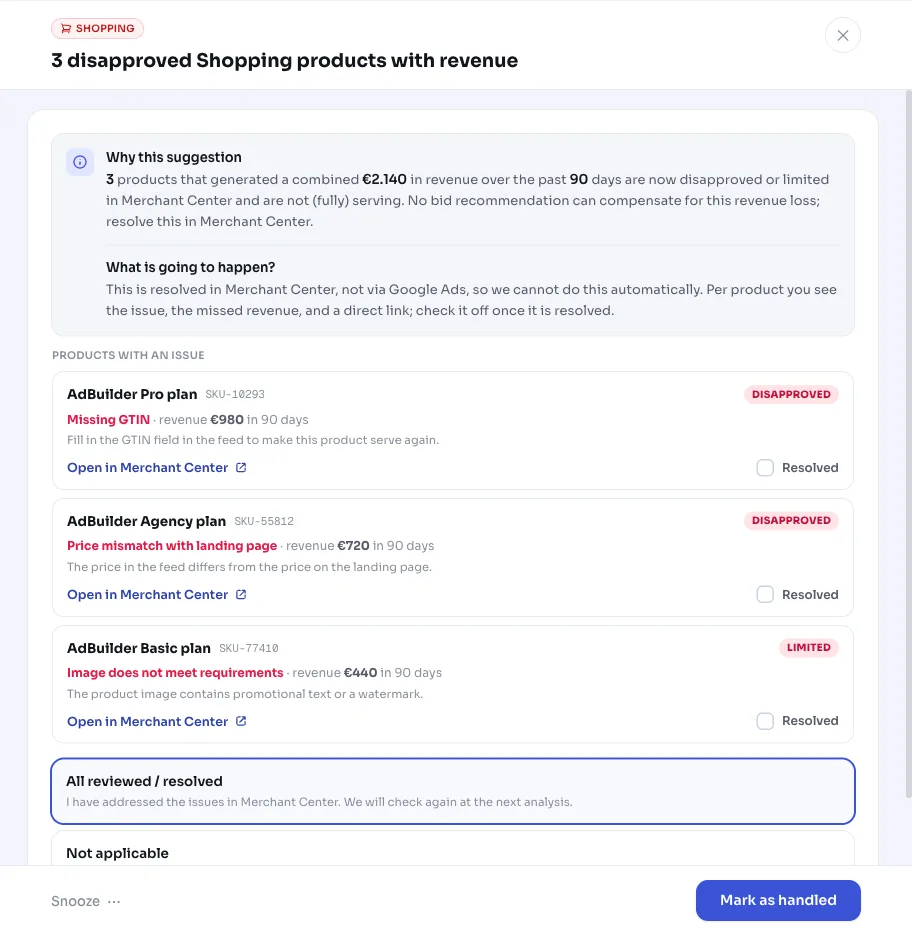
AdBuilder doesn't change anything in Google Ads here: you fix the problem in Merchant Center. The recommendation shows the issue, the revenue, and a deep link that takes you straight to the right product in Merchant Center. So you don't have to search for which item to correct.
Work through the list from top to bottom: the products with the highest revenue give you the fastest results. Once you fix an issue in the feed, Google usually picks up the new status within a few days and the product starts serving again.
- Open the product via the deep link to Merchant Center and check the issue shown.
- Fix the cause in your product feed or Merchant Center settings (for example, a missing attribute, a policy issue, or an incorrect value).
- Check off the product in the recommendation once you've fixed it, or snooze it if you'll pick it up later.
- Repeat this for the other flagged products, in order of revenue.
Frequently asked questions
Why is my product disapproved in Merchant Center?
A disapproved product has a specific issue in the feed or in policy, for example a missing or incorrect attribute, a price mismatch with the landing page, or a policy violation. AdBuilder shows the specific issue for each flagged product and a deep link to Merchant Center, so you know exactly what to fix. You make the actual fix in Merchant Center.
What's the difference between a disapproved and a limited product?
A disapproved (not eligible) product isn't shown in Google Shopping at all. A limited (eligible limited) product does serve, but not fully, for example not in all networks or regions. Both fall under this recommendation once they have a specific issue and previously generated revenue.
Does AdBuilder change anything in my Google Ads campaign?
No. This recommendation is informational only: nothing is changed in Google Ads. The problem is in Merchant Center, and that's where you fix it too. AdBuilder just points you to the right products and calculates what the lost revenue costs you per month.
Why does AdBuilder look back a full year?
A product that's been disapproved for months has €0 revenue in a short period and would drop out of view, even though that's actually the most expensive case. With a 365-day window, AdBuilder also catches top sellers that have been disapproved longer. The revenue is converted into a monthly estimate, so the amount doesn't scale up with the window size.
Why isn't an out-of-stock product listed?
Products marked out of stock rightfully don't serve, so there's nothing to fix in Merchant Center. AdBuilder deliberately skips those, so the list only contains products where a real fix is possible.