- Category
- Bidding & budget
- What it changes
- The target (target CPA or target ROAS) of a portfolio bid strategy
- Reversible
- Yes, the old target is preserved and can be restored
- Data we use
- 90 days of cost, conversions and conversion value per portfolio strategy
- Typical trigger
- Actual CPA or ROAS deviates at least 25% from the target, with at least 30 conversions
- Priority
- Bidding tier (after cleaning up waste, before budget scaling)
What it detectsWhen the portfolio target no longer holds up
A portfolio bid strategy is a shared bid strategy in Google Ads that multiple campaigns run on with a common target, such as a target CPA or target ROAS. Smart Bidding steers bids toward that target. If the target is too far from reality, you're structurally bidding too tight or too loose.
This recommendation looks per portfolio strategy at the set target and compares it with actual performance over the past 90 days. If the target clearly deviates, AdBuilder flags that the strategy is bidding toward a target that no longer matches what the campaigns are really doing.
Important: this is about the strategy itself, not individual campaigns. Campaigns attached to a portfolio strategy don't have their own target value at campaign level, so the per-campaign calibration (bid:target-calibrate) skips them. This recommendation fills that gap at strategy level.
Why it mattersA wrong target quietly costs you returns
If your target CPA is set lower than what's realistically achievable, Smart Bidding pulls back on bids and leaves impressions and conversions on the table that were actually within reach. If the target is set too loose, you buy pricier clicks than needed and pay too much per conversion. It works the same way with a target ROAS, just reversed: a target ROAS set too high chokes volume, one set too low leaves efficiency on the table.
Because this is a portfolio strategy, a target that's off counts extra heavily: that single target steers all connected campaigns at once. A small miscalibration ripples through your entire portfolio.
Setting the target at a realistic level gives Smart Bidding a stable anchor. That helps the algorithm bid more calmly and predictably, instead of chasing a target it can't reach anyway.
How it worksThe thresholds behind the detection
AdBuilder sums the cost, conversions and conversion value of all connected, active campaigns per portfolio bid strategy over a fixed 90-day window. From that total it derives the actual CPA (cost divided by conversions) or the actual ROAS (conversion value divided by cost).
A strategy only qualifies with at least 30 conversions over that 90-day period and only if a target is actually set. Below that conversion threshold, an average is too noisy to revise a target on. The recommendation appears when the gap between target and reality is at least 25%.
- Lookback window: 90 days (fixed, not dynamic).
- Conversion gate: at least 30 conversions per strategy over that 90-day period.
- Deviation: target and actual CPA or ROAS differ by at least 25%.
- Step size: the target moves at most 25% per step toward the actual value, never past it.
- Learning-phase protection: if the target or strategy of a connected campaign changed in the past 14 days, the strategy is skipped this round.
- Tightening only when there's room: if a strategy outperforms its target, AdBuilder only sets a stricter target if the budget isn't constraining it (less than 5% impression share lost to budget). Loosening an unrealistic target is always allowed.
- After applying, this recommendation has a 90-day cooldown.
What you can doAdjust the target, at your own pace
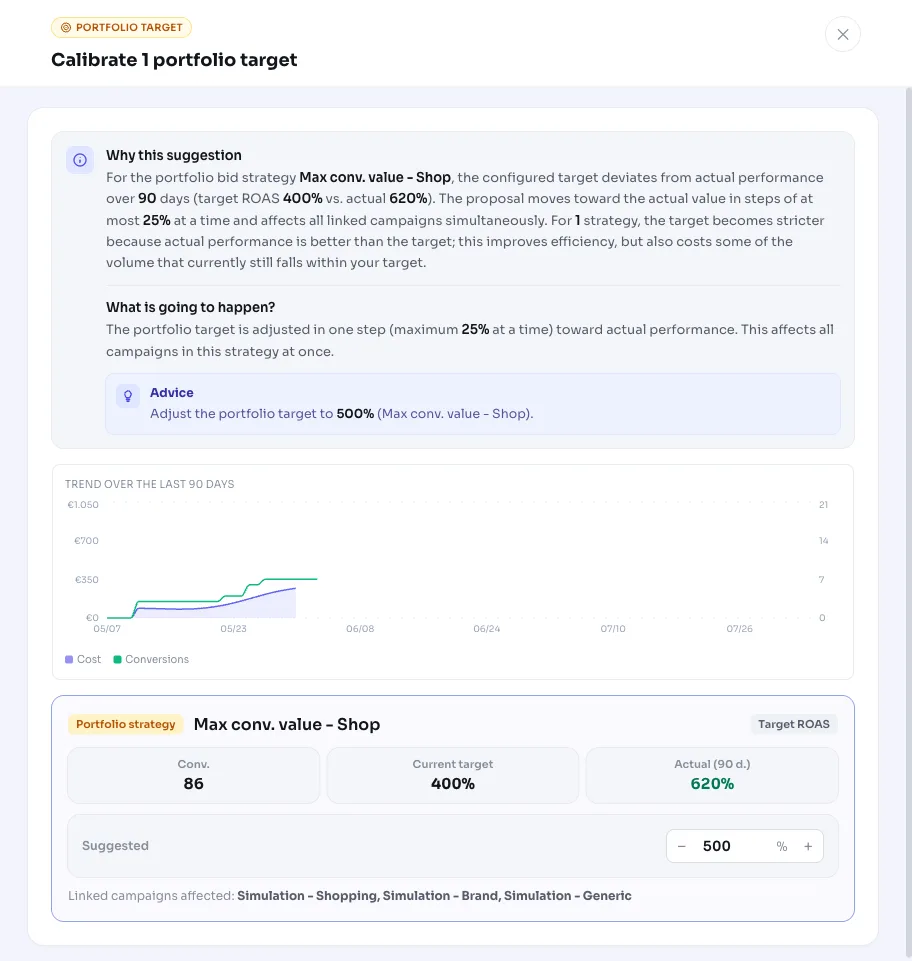
The recommendation shows per portfolio strategy the current target, what the campaigns actually achieve, and the proposed new target. For a target CPA that's shown in euros, for a target ROAS as a percentage, just like Google Ads displays it. For a strategy that consistently beats its target, you'll also see that a stricter target improves efficiency but costs some of the volume currently within your target.
Applying it changes the target value on the portfolio bid strategy itself, so on all connected campaigns at once. Right before applying, AdBuilder checks whether the live target still matches the measured value. If you or someone else has changed it in the meantime, that strategy is skipped so a fresh setting isn't overwritten.
The old target is preserved, so you can revert the change if you don't like the result.
- Adjust the proposed target per strategy or accept the suggestion.
- Select only the strategies you want to calibrate and leave the rest alone.
- Apply: the new target moves in a step of at most 25% toward the actual value.
- Roll back whenever you want; the previous target is preserved.
Frequently asked questions
What is a portfolio bid strategy in Google Ads?
A portfolio bid strategy is a shared, automated bid strategy that multiple campaigns run on with a common target, such as a target CPA or target ROAS. Smart Bidding optimizes all connected campaigns toward that one target.
What does calibrating the target mean?
Calibrating means adjusting the target (target CPA or target ROAS) to a level that matches what the campaigns actually achieve. AdBuilder does this in steps of at most 25% per time, so Smart Bidding keeps learning steadily instead of abruptly changing course.
What's the difference with campaign-level calibration?
The campaign variant (bid:target-calibrate) looks at campaigns with their own target. Campaigns attached to a portfolio strategy have no target value at campaign level and are skipped there. This recommendation picks up exactly those portfolio strategies at strategy level.
Is my target adjusted automatically?
No. AdBuilder flags the deviation and makes a proposal. You choose which strategies to calibrate and can adjust the proposed target per strategy before applying it.
Can I revert the change?
Yes. The old target is preserved, so you can undo the target change on the portfolio bid strategy.
Why don't I see this recommendation for a strategy that seems to fit?
Often because one of the thresholds isn't met: fewer than 30 conversions over 90 days, less than 25% deviation between target and reality, a target or strategy changed in the past 14 days (learning phase), or a stricter target being held back because the budget is already constraining it.