- Category
- Bidding & budget
- What it changes
- Builds an ad schedule and lowers (or pauses) the bid on weak dayparts
- Reversible
- Yes, you can remove the ad schedule again
- Data we use
- 90 days of cost, clicks and conversions per day and daypart (Search)
- Typical trigger
- Manual bidding or Maximize clicks, at least 15 conversions in 90 days, dayparts with cost per conversion far above average
- Priority
- Bid tier (tier 4 of 7), after measurement, quality and structure
What it flagsWhich days and hours are costing you too much?
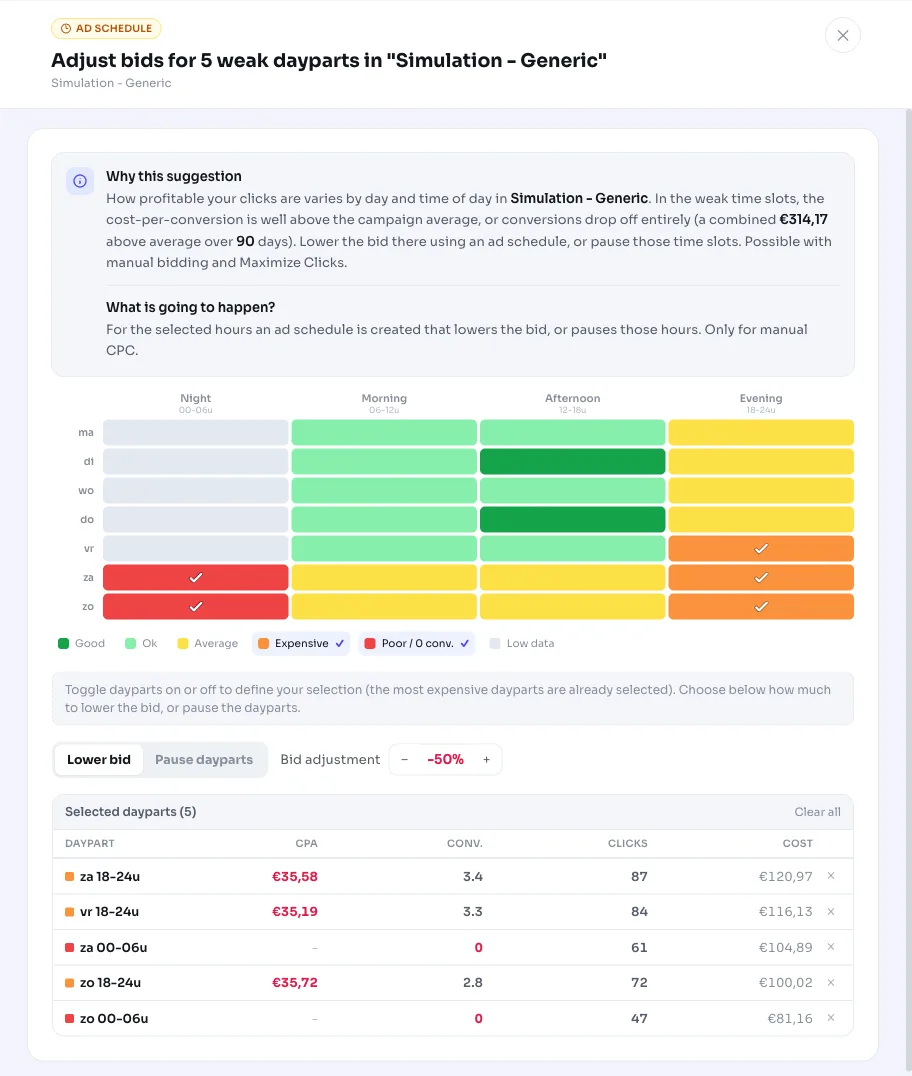
Not every moment of the week delivers equally cheap conversions. In one campaign, weekday afternoons convert nicely while nights or weekends mostly cost money without results. This recommendation splits a campaign into 28 cells (7 days times 4 six-hour dayparts) and scores each cell against the campaign's overall average cost per conversion.
If one or more dayparts are consistently much more expensive than average, or don't convert at all despite spend going through them, we flag them as weak. We then suggest lowering the bid or turning off those dayparts with an ad schedule (also known as ad scheduling).
Why it mattersWhy an ad schedule pays off
As long as you set the same bid across all hours, you pay just as much per click during your worst dayparts as your best. That money could have gone to the moments that do convert. Ad scheduling is the simplest way to win back that difference without overhauling your whole bidding strategy in Google Ads.
This recommendation only appears for manual bidding and Maximize clicks. With those strategies, you (or the bid cap) set the cost per click, so a per-daypart adjustment actually does something. With Smart Bidding, Google already sets the bid automatically based on context and ignores your fixed per-daypart bid adjustment, so we skip this recommendation there.
How it worksHow AdBuilder determines weak dayparts
We look at 90 days of data per campaign, with a short buffer for the most recent days so late conversions aren't counted as losses. The recommendation only runs on enabled search campaigns on manual bidding or Maximize clicks, and the campaign must have at least 15 conversions in those 90 days. Below that volume there isn't enough data to say anything meaningful per daypart.
We split each cell by day and daypart: night (0-6h), morning (6-12h), afternoon (12-18h) and evening (18-24h). We only evaluate a cell once it has at least 10 clicks and cost above half the campaign CPA. A cell counts as a dead daypart when there are zero conversions while cost is at least 3 times the average cost per conversion. Below that threshold, zero conversions is just chance and not worth a negative verdict.
The recommendation only appears once the combined waste in the weak dayparts (the portion of cost above the campaign average) reaches at least 2 times the campaign CPA, with an absolute floor of 5 euros. Campaigns that already have an ad schedule are skipped, since we don't overwrite your existing schedule. And if there's already an open recommendation to adjust bids by device, location or audience in the same campaign, we wait, because those bid adjustments would compound.
- Strong (score 0): cost per conversion 75% or lower than average. This feeds the separate recommendation to raise the bid.
- Good (1) and neutral (2): around the campaign average, no action.
- Weak (3): cost per conversion 1.3 to 1.8 times the average.
- Poor or dead (4): more than 1.8 times the average, or zero conversions at 3 times the CPA or more in cost.
- Not enough data (5): fewer than 10 clicks or too little cost to judge.
- Only dayparts scored 3 or 4 count toward this recommendation.
What you can doWhat you can do
The recommendation builds an ad schedule for the campaign and applies a lower bid on the weak dayparts. If you want to stop serving a daypart entirely, you can pause it instead. When you apply it, the rest of the week is left untouched.
Everything is reversible: you can remove the ad schedule again in AdBuilder or in Google Ads if the results disappoint. Alongside this recommendation, you may also see a counterpart suggesting you raise the bid on the strong dayparts, so you capture more of that profitable traffic.
- Lower the bid on the flagged weak dayparts via an ad schedule.
- Pause those dayparts if they consistently deliver nothing.
- Undo the change by removing the ad schedule.
- Separately: raise the bid on the strong dayparts (separate recommendation).
Frequently asked questions
How do I set up an ad schedule?
AdBuilder builds the schedule for you based on the weak dayparts: you confirm the recommendation and we apply a lower bid (or a pause) via ad scheduling. You don't need to look up the days and hours yourself.
Does this also work with Smart Bidding?
No. This recommendation only appears for manual bidding and Maximize clicks. Smart Bidding already sets the bid itself based on context and ignores a fixed per-daypart bid adjustment, so the change would have no effect there.
Why can't I adjust the bid per individual hour?
We group the week into 6-hour dayparts instead of individual hours. With around 15 conversions, splitting across 168 hourly cells would leave too little data per cell (around 0.1 conversions), so you'd be reacting to noise. With 28 daypart cells, each verdict rests on enough clicks and cost.
Can I later undo a bid decrease on certain hours?
Yes. The ad schedule is fully reversible: remove it and the bid adjustment disappears, and your normal bids apply everywhere again.
How much data does AdBuilder need before this recommendation appears?
The campaign needs at least 15 conversions in 90 days, and a weak daypart only counts once it has at least 10 clicks. The combined waste in the weak dayparts must also be at least 2 times the cost per conversion (with 5 euros as the floor).