- Category
- Targeting & structure
- What it changes
- Adds negative content label exclusions at the account or campaign level
- Reversible
- Yes, you can remove the exclusions again later
- Data we use
- Active campaigns on Display, Performance Max, video or Demand Gen plus existing exclusions. No conversion figures
- Typical trigger
- At least one active campaign showing on the Display Network or YouTube, with not-yet-excluded default categories
- Priority
- Medium, part of the waste-prevention layer (preemptive)
What it flagsWhat this recommendation flags
On the Display Network and on YouTube, ads often appear alongside content categories that rarely lead to a sale and are known as junk traffic. Parked domains and error pages, for example, generate a lot of accidental clicks, and next to sensitive content (tragedy, sexually suggestive pages) you generally don't want to appear anyway.
The recommendation appears as soon as your account has at least one active campaign showing on the Display Network or YouTube: a Display campaign, or a Performance Max, video or Demand Gen campaign. This is a preventive best practice, not an alert based on your own figures. Google doesn't measure these categories separately, so you can't wait for the waste to show up in a report. That's why AdBuilder suggests excluding the known problem categories upfront.
Why it mattersWhy you want to exclude unwanted content categories
The Display Network is enormous. Your ad can easily end up next to content where almost no one has purchase intent, or where a click happens mostly by accident (think an ad in a games app). Those impressions and clicks still cost budget, but rarely produce anything.
Brand safety matters too. Next to tragedy, coarse language or controversial topics, most brands don't want to be visible. Excluding these categories upfront prevents waste and unwanted placements in one move, without having to collect weeks of data first.
How it worksHow AdBuilder determines the recommendation
AdBuilder first checks whether your account has active campaigns with a channel type of Display, Performance Max, video or Demand Gen. If it doesn't (for example, an account with only search campaigns), the recommendation doesn't appear.
Next, it checks what you've already excluded. Both account-wide content exclusions and campaign-level exclusions count: a category already excluded on all relevant campaigns is treated as covered. Already-covered categories drop out of the curated list of eleven. The recommendation only opens if at least one of the four preselected default categories is still uncovered. If all four are already covered, the recommendation stays silent, so it doesn't keep reminding you about optional categories you deliberately left open.
There's deliberately no conversion threshold: this advice isn't data-driven, it's a fixed best practice. If you use Performance Max, one thing to note: that channel type only supports this exclusion at the account level; a campaign-level exclusion skips Performance Max campaigns. AdBuilder mentions this in the recommendation itself.
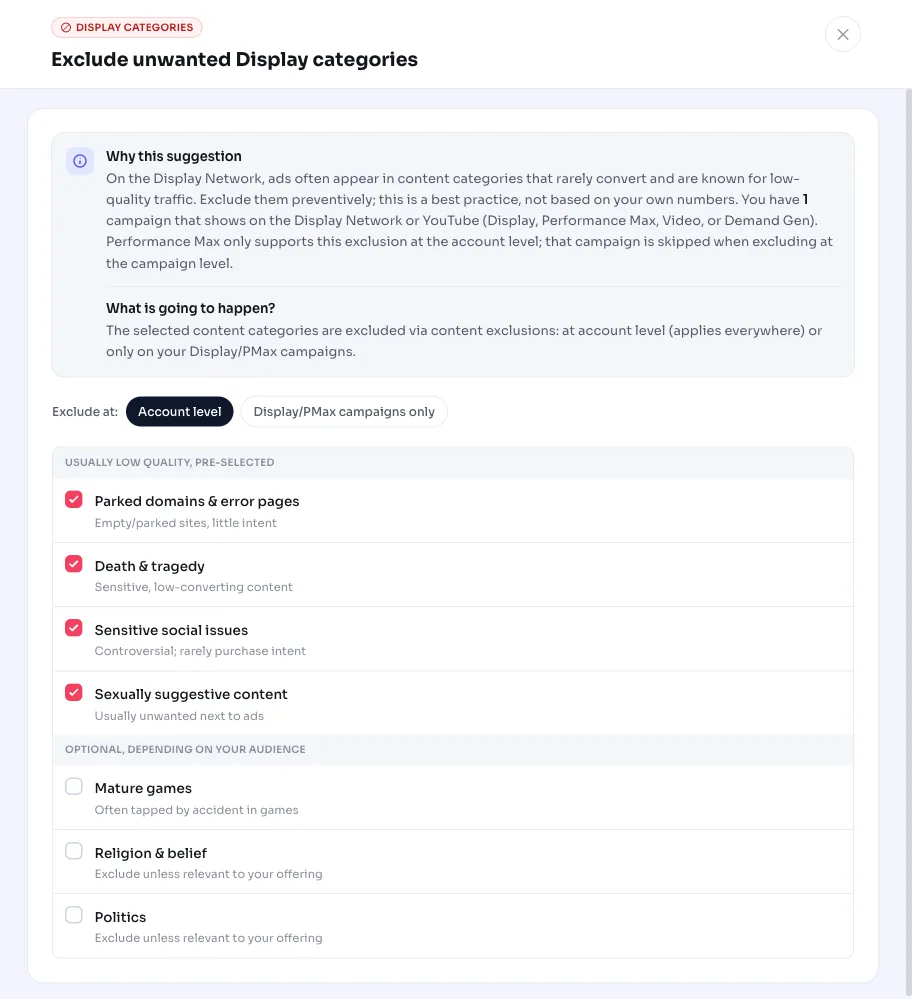
- Preselected by default: parked domains and error pages, death and tragedy, sensitive social issues, and sexually suggestive content.
- Optional (select yourself): profanity, juvenile or edgy content, below the fold, fighting games, adult games, religion and spirituality, and politics.
- Categories already excluded account-wide or on all relevant campaigns are skipped.
- Only active (ENABLED) campaigns on Display, Performance Max, video or Demand Gen count.
What you can doWhat you can do
You apply the exclusion in one action. The four default categories are pre-checked; you can add the optional categories yourself if they fit your business (religion and politics, for instance, are only relevant to exclude if they're unrelated to your offering).
Then choose whether to exclude at the account level or the campaign level. Account-wide is the most thorough and the only option that also covers Performance Max campaigns. If you're unhappy with an exclusion later, you simply revert it by removing the content label.
- Check or uncheck the suggested categories; the four defaults are pre-selected.
- Choose exclude at the account level (also covers Performance Max) or only on the campaigns involved.
- Only add optional categories like religion or politics if they don't fit your offering.
- You can always revert by removing the exclusion again.
Frequently asked questions
How do I exclude content categories in Google Ads?
You exclude content categories with negative content label criteria, at the account or campaign level. AdBuilder does this in one step: it suggests a curated set of unwanted categories and sets up the exclusions after your approval.
Why isn't this recommendation based on my own figures?
Google doesn't measure these content categories separately, so you won't see the waste in a report. That's why this is a preemptive best practice: you exclude the known problem categories upfront instead of reacting to data afterward.
Does this also apply to Performance Max?
Yes, but Performance Max only supports this exclusion at the account level. If you exclude only at the campaign level, your Performance Max campaigns are skipped. Choose account-wide if you want to cover those too.
Can I undo the exclusion?
Yes. Excluding a content category is fully reversible: you remove the corresponding content label and the category is included again.
Why don't I see this recommendation?
The recommendation only appears if you have an active campaign on Display, Performance Max, video or Demand Gen and at least one default category is still uncovered. If you only have search campaigns, or the four default categories are already excluded, it stays silent.